<?xml version="1.0" encoding="utf-8"?>
    <feed xmlns="http://www.w3.org/2005/Atom" xmlns:media="http://search.yahoo.com/mrss/">
      <generator uri="https://astro.build/">Astro</generator>
      <link href="https://www.bariskisir.com/feed.xml" rel="self" type="application/atom+xml"/>
      <link href="https://www.bariskisir.com/" rel="alternate" type="text/html"/>
      <id>https://www.bariskisir.com/feed.xml</id><updated>2026-08-09T10:00:00+03:00</updated>
      <title type="html">Barış Kısır</title><subtitle>Barış Kısır - Lead Software Developer | Personal Website &amp; Blog</subtitle>
      <author><name>Barış Kısır</name></author><entry>
      <title type="html">Deploying and Scaling AI Models on Azure Container Apps</title>
      <link href="https://www.bariskisir.com/blog/deploying-and-scaling-ai-models-on-azure-container-apps" rel="alternate" type="text/html" title="Deploying and Scaling AI Models on Azure Container Apps"/>
      <id>https://www.bariskisir.com/blog/deploying-and-scaling-ai-models-on-azure-container-apps</id><published>2026-08-09T10:00:00+03:00</published><updated>2026-08-09T10:00:00+03:00</updated>
      <author><name>Barış Kısır</name></author>
      <content type="html" xml:base="https://www.bariskisir.com/blog/deploying-and-scaling-ai-models-on-azure-container-apps"><![CDATA[<p>Running AI models in production means dealing with cold starts, GPU availability, and unpredictable traffic patterns. Azure Container Apps (ACA) with GPU-enabled workload profiles solves this without the overhead of full Kubernetes. This post covers the end-to-end workflow, from Docker image to auto-scaled, production-ready inference endpoint.</p>
<hr>
<h2 id="why-container-apps-over-aks-for-ai-inference">Why Container Apps over AKS for AI Inference</h2>
<p>AKS is the right choice when you need multi-node GPU clusters with custom scheduling. But for many inference workloads, such as text embeddings, smaller language models, and classification pipelines, ACA’s serverless GPU profiles strike a better balance. You get scale-to-zero during idle periods, event-driven scaling via KEDA, and managed TLS termination without maintaining a cluster.</p>
<hr>
<h3 id="gpu-workload-profiles">GPU Workload Profiles</h3>
<p>ACA supports dedicated GPU workload profiles with NVIDIA A10 and T4 GPUs. You assign a workload profile to your container app environment at creation time.</p>
<pre class="astro-code notebook" style="background-color:#1b1e19;color:#e5e9de; overflow-x: auto;" tabindex="0" data-language="bash"><code><span class="line"><span style="color:#E2D69B">az</span><span style="color:#C0D99C"> containerapp</span><span style="color:#C0D99C"> env</span><span style="color:#C0D99C"> create</span><span style="color:#E5E9DE"> \</span></span>
<span class="line"><span style="color:#C0D99C">  --name</span><span style="color:#C0D99C"> ai-inference-env</span><span style="color:#E5E9DE"> \</span></span>
<span class="line"><span style="color:#C0D99C">  --resource-group</span><span style="color:#C0D99C"> ai-production</span><span style="color:#E5E9DE"> \</span></span>
<span class="line"><span style="color:#C0D99C">  --location</span><span style="color:#C0D99C"> westeurope</span><span style="color:#E5E9DE"> \</span></span>
<span class="line"><span style="color:#C0D99C">  --enable-workload-profiles</span></span></code></pre>
<p>Then add a GPU profile:</p>
<pre class="astro-code notebook" style="background-color:#1b1e19;color:#e5e9de; overflow-x: auto;" tabindex="0" data-language="bash"><code><span class="line"><span style="color:#E2D69B">az</span><span style="color:#C0D99C"> containerapp</span><span style="color:#C0D99C"> env</span><span style="color:#C0D99C"> workload-profile</span><span style="color:#C0D99C"> add</span><span style="color:#E5E9DE"> \</span></span>
<span class="line"><span style="color:#C0D99C">  --name</span><span style="color:#C0D99C"> ai-inference-env</span><span style="color:#E5E9DE"> \</span></span>
<span class="line"><span style="color:#C0D99C">  --resource-group</span><span style="color:#C0D99C"> ai-production</span><span style="color:#E5E9DE"> \</span></span>
<span class="line"><span style="color:#C0D99C">  --workload-profile-type</span><span style="color:#C0D99C"> NC4as_T4_v3</span><span style="color:#E5E9DE"> \</span></span>
<span class="line"><span style="color:#C0D99C">  --workload-profile-name</span><span style="color:#C0D99C"> gpu-t4</span><span style="color:#E5E9DE"> \</span></span>
<span class="line"><span style="color:#C0D99C">  --min-nodes</span><span style="color:#E4BC8A"> 0</span><span style="color:#E5E9DE"> \</span></span>
<span class="line"><span style="color:#C0D99C">  --max-nodes</span><span style="color:#E4BC8A"> 5</span></span></code></pre>
<p>The workload profile type determines the GPU model and vCPU/memory allocation. <code>NC4as_T4_v3</code> gives you a single T4 GPU with 4 vCPUs and 28 GB RAM, solid for a 7B-parameter model.</p>
<hr>
<h3 id="dockerizing-the-inference-server">Dockerizing the Inference Server</h3>
<p>Package your model server with the model weights baked in or mounted from Azure Files. For smaller models (&#x3C; 3 GB), embedding weights in the image avoids cold-start downloads.</p>
<pre class="astro-code notebook" style="background-color:#1b1e19;color:#e5e9de; overflow-x: auto;" tabindex="0" data-language="dockerfile"><code><span class="line"><span style="color:#C8A7EB">FROM</span><span style="color:#E5E9DE"> nvidia/cuda:12.4.0-runtime-ubuntu22.04</span></span>
<span class="line"></span>
<span class="line"><span style="color:#C8A7EB">RUN</span><span style="color:#E5E9DE"> apt-get update &#x26;&#x26; apt-get install -y python3.11 python3-pip &#x26;&#x26; \</span></span>
<span class="line"><span style="color:#E5E9DE">    pip3 install vllm fastapi uvicorn</span></span>
<span class="line"></span>
<span class="line"><span style="color:#C8A7EB">WORKDIR</span><span style="color:#E5E9DE"> /app</span></span>
<span class="line"><span style="color:#C8A7EB">COPY</span><span style="color:#E5E9DE"> ./model /app/model</span></span>
<span class="line"><span style="color:#C8A7EB">COPY</span><span style="color:#E5E9DE"> ./serve.py /app/</span></span>
<span class="line"></span>
<span class="line"><span style="color:#C8A7EB">ENV</span><span style="color:#E5E9DE"> MODEL_PATH=/app/model</span></span>
<span class="line"><span style="color:#C8A7EB">ENV</span><span style="color:#E5E9DE"> CUDA_VISIBLE_DEVICES=0</span></span>
<span class="line"></span>
<span class="line"><span style="color:#C8A7EB">EXPOSE</span><span style="color:#E5E9DE"> 8000</span></span>
<span class="line"></span>
<span class="line"><span style="color:#C8A7EB">CMD</span><span style="color:#E5E9DE"> [</span><span style="color:#C0D99C">"python3"</span><span style="color:#E5E9DE">, </span><span style="color:#C0D99C">"-m"</span><span style="color:#E5E9DE">, </span><span style="color:#C0D99C">"uvicorn"</span><span style="color:#E5E9DE">, </span><span style="color:#C0D99C">"serve:app"</span><span style="color:#E5E9DE">, </span><span style="color:#C0D99C">"--host"</span><span style="color:#E5E9DE">, </span><span style="color:#C0D99C">"0.0.0.0"</span><span style="color:#E5E9DE">, </span><span style="color:#C0D99C">"--port"</span><span style="color:#E5E9DE">, </span><span style="color:#C0D99C">"8000"</span><span style="color:#E5E9DE">]</span></span></code></pre>
<p>For larger models, use an init container to download weights from Azure Blob Storage or a model registry before the main container starts.</p>
<hr>
<h3 id="deploying-to-azure-container-apps">Deploying to Azure Container Apps</h3>
<p>Push your image to Azure Container Registry and deploy with GPU allocation.</p>
<pre class="astro-code notebook" style="background-color:#1b1e19;color:#e5e9de; overflow-x: auto;" tabindex="0" data-language="bash"><code><span class="line"><span style="color:#E2D69B">az</span><span style="color:#C0D99C"> acr</span><span style="color:#C0D99C"> build</span><span style="color:#C0D99C"> --registry</span><span style="color:#C0D99C"> aiRegistry</span><span style="color:#C0D99C"> --image</span><span style="color:#C0D99C"> inference-server:v1</span><span style="color:#C0D99C"> .</span></span>
<span class="line"></span>
<span class="line"><span style="color:#E2D69B">az</span><span style="color:#C0D99C"> containerapp</span><span style="color:#C0D99C"> create</span><span style="color:#E5E9DE"> \</span></span>
<span class="line"><span style="color:#C0D99C">  --name</span><span style="color:#C0D99C"> phi4-inference</span><span style="color:#E5E9DE"> \</span></span>
<span class="line"><span style="color:#C0D99C">  --resource-group</span><span style="color:#C0D99C"> ai-production</span><span style="color:#E5E9DE"> \</span></span>
<span class="line"><span style="color:#C0D99C">  --environment</span><span style="color:#C0D99C"> ai-inference-env</span><span style="color:#E5E9DE"> \</span></span>
<span class="line"><span style="color:#C0D99C">  --image</span><span style="color:#C0D99C"> aiRegistry.azurecr.io/inference-server:v1</span><span style="color:#E5E9DE"> \</span></span>
<span class="line"><span style="color:#C0D99C">  --target-port</span><span style="color:#E4BC8A"> 8000</span><span style="color:#E5E9DE"> \</span></span>
<span class="line"><span style="color:#C0D99C">  --ingress</span><span style="color:#C0D99C"> external</span><span style="color:#E5E9DE"> \</span></span>
<span class="line"><span style="color:#C0D99C">  --workload-profile-name</span><span style="color:#C0D99C"> gpu-t4</span><span style="color:#E5E9DE"> \</span></span>
<span class="line"><span style="color:#C0D99C">  --cpu</span><span style="color:#E4BC8A"> 2.0</span><span style="color:#E5E9DE"> \</span></span>
<span class="line"><span style="color:#C0D99C">  --memory</span><span style="color:#C0D99C"> 14.0Gi</span><span style="color:#E5E9DE"> \</span></span>
<span class="line"><span style="color:#C0D99C">  --gpu</span><span style="color:#E4BC8A"> 1</span><span style="color:#E5E9DE"> \</span></span>
<span class="line"><span style="color:#C0D99C">  --min-replicas</span><span style="color:#E4BC8A"> 1</span><span style="color:#E5E9DE"> \</span></span>
<span class="line"><span style="color:#C0D99C">  --max-replicas</span><span style="color:#E4BC8A"> 10</span><span style="color:#E5E9DE"> \</span></span>
<span class="line"><span style="color:#C0D99C">  --scale-rule-name</span><span style="color:#C0D99C"> http-scale</span><span style="color:#E5E9DE"> \</span></span>
<span class="line"><span style="color:#C0D99C">  --scale-rule-type</span><span style="color:#C0D99C"> http</span><span style="color:#E5E9DE"> \</span></span>
<span class="line"><span style="color:#C0D99C">  --scale-rule-http-concurrency</span><span style="color:#E4BC8A"> 5</span><span style="color:#E5E9DE"> \</span></span>
<span class="line"><span style="color:#C0D99C">  --env-vars</span><span style="color:#C0D99C"> MODEL_NAME=phi-4</span><span style="color:#C0D99C"> AZURE_STORAGE_CONNECTION=secretref:storage-conn</span></span></code></pre>
<p>The <code>--gpu 1</code> flag allocates one full GPU to each replica. ACA stripes GPU requests in increments of 1. You can’t request fractional GPUs.</p>
<hr>
<h3 id="autoscaling-with-keda">Autoscaling with KEDA</h3>
<p>ACA uses KEDA under the hood. For inference workloads, HTTP concurrency scaling works well, but you can also scale on custom metrics like queue depth or request latency.</p>
<pre class="astro-code notebook" style="background-color:#1b1e19;color:#e5e9de; overflow-x: auto;" tabindex="0" data-language="bash"><code><span class="line"><span style="color:#E2D69B">az</span><span style="color:#C0D99C"> containerapp</span><span style="color:#C0D99C"> update</span><span style="color:#E5E9DE"> \</span></span>
<span class="line"><span style="color:#C0D99C">  --name</span><span style="color:#C0D99C"> phi4-inference</span><span style="color:#E5E9DE"> \</span></span>
<span class="line"><span style="color:#C0D99C">  --resource-group</span><span style="color:#C0D99C"> ai-production</span><span style="color:#E5E9DE"> \</span></span>
<span class="line"><span style="color:#C0D99C">  --scale-rule-name</span><span style="color:#C0D99C"> gpu-queue</span><span style="color:#E5E9DE"> \</span></span>
<span class="line"><span style="color:#C0D99C">  --scale-rule-type</span><span style="color:#C0D99C"> azure-queue</span><span style="color:#E5E9DE"> \</span></span>
<span class="line"><span style="color:#C0D99C">  --scale-rule-metadata</span><span style="color:#E5E9DE"> \</span></span>
<span class="line"><span style="color:#C0D99C">    queueName=inference-requests</span><span style="color:#E5E9DE"> \</span></span>
<span class="line"><span style="color:#C0D99C">    queueLength=</span><span style="color:#E4BC8A">10</span><span style="color:#E5E9DE"> \</span></span>
<span class="line"><span style="color:#C0D99C">  --scale-rule-auth</span><span style="color:#C0D99C"> connection=queue-conn</span></span></code></pre>
<p>Scale-to-zero is powerful for cost control. A T4 GPU costs approximately $0.50/hour. If your inference endpoint sees traffic only 8 hours a day, scale-to-zero saves 66% over a 24/7 deployment.</p>
<hr>
<h3 id="model-caching-strategy">Model Caching Strategy</h3>
<p>Cold starts are the biggest UX problem with scale-to-zero. Mitigate this with a layered caching approach.</p>
<pre class="astro-code notebook" style="background-color:#1b1e19;color:#e5e9de; overflow-x: auto;" tabindex="0" data-language="python"><code><span class="line"><span style="color:#C8A7EB">import</span><span style="color:#E5E9DE"> os</span></span>
<span class="line"><span style="color:#C8A7EB">import</span><span style="color:#E5E9DE"> hashlib</span></span>
<span class="line"><span style="color:#C8A7EB">from</span><span style="color:#E5E9DE"> pathlib </span><span style="color:#C8A7EB">import</span><span style="color:#E5E9DE"> Path</span></span>
<span class="line"></span>
<span class="line"><span style="color:#E5E9DE">CACHE_DIR </span><span style="color:#D2D9CA">=</span><span style="color:#E5E9DE"> Path(</span><span style="color:#C0D99C">"/mnt/model-cache"</span><span style="color:#E5E9DE">)</span></span>
<span class="line"></span>
<span class="line"><span style="color:#C8A7EB">def</span><span style="color:#E2D69B"> get_cached_model</span><span style="color:#E5E9DE">(</span><span style="color:#A8CEE5">model_name</span><span style="color:#E5E9DE">: </span><span style="color:#95D5CE">str</span><span style="color:#E5E9DE">, </span><span style="color:#A8CEE5">version</span><span style="color:#E5E9DE">: </span><span style="color:#95D5CE">str</span><span style="color:#E5E9DE">):</span></span>
<span class="line"><span style="color:#E5E9DE">    cache_key </span><span style="color:#D2D9CA">=</span><span style="color:#E5E9DE"> hashlib.sha256(</span><span style="color:#C8A7EB">f</span><span style="color:#C0D99C">"</span><span style="color:#E5E9DE">{model_name}</span><span style="color:#C0D99C">@</span><span style="color:#E5E9DE">{version}</span><span style="color:#C0D99C">"</span><span style="color:#E5E9DE">.encode()).hexdigest()[:</span><span style="color:#E4BC8A">16</span><span style="color:#E5E9DE">]</span></span>
<span class="line"><span style="color:#E5E9DE">    cache_path </span><span style="color:#D2D9CA">=</span><span style="color:#E5E9DE"> CACHE_DIR </span><span style="color:#D2D9CA">/</span><span style="color:#E5E9DE"> cache_key</span></span>
<span class="line"></span>
<span class="line"><span style="color:#C8A7EB">    if</span><span style="color:#E5E9DE"> cache_path.exists():</span></span>
<span class="line"><span style="color:#C8A7EB">        return</span><span style="color:#95D5CE"> str</span><span style="color:#E5E9DE">(cache_path)</span></span>
<span class="line"></span>
<span class="line"><span style="color:#98A88B;font-style:italic">    # Download only if miss — use Azure Blob with high throughput</span></span>
<span class="line"><span style="color:#E5E9DE">    download_from_blob(model_name, version, cache_path)</span></span>
<span class="line"><span style="color:#C8A7EB">    return</span><span style="color:#95D5CE"> str</span><span style="color:#E5E9DE">(cache_path)</span></span></code></pre>
<p>Mount an Azure Files share at <code>/mnt/model-cache</code> across all replicas. The first replica warms the cache; subsequent replicas and scale-out instances read from it.</p>
<pre class="astro-code notebook" style="background-color:#1b1e19;color:#e5e9de; overflow-x: auto;" tabindex="0" data-language="bash"><code><span class="line"><span style="color:#E2D69B">az</span><span style="color:#C0D99C"> containerapp</span><span style="color:#C0D99C"> env</span><span style="color:#C0D99C"> storage</span><span style="color:#C0D99C"> set</span><span style="color:#E5E9DE"> \</span></span>
<span class="line"><span style="color:#C0D99C">  --name</span><span style="color:#C0D99C"> ai-inference-env</span><span style="color:#E5E9DE"> \</span></span>
<span class="line"><span style="color:#C0D99C">  --resource-group</span><span style="color:#C0D99C"> ai-production</span><span style="color:#E5E9DE"> \</span></span>
<span class="line"><span style="color:#C0D99C">  --storage-name</span><span style="color:#C0D99C"> modelcache</span><span style="color:#E5E9DE"> \</span></span>
<span class="line"><span style="color:#C0D99C">  --azure-file-account-name</span><span style="color:#C0D99C"> aistorageacct</span><span style="color:#E5E9DE"> \</span></span>
<span class="line"><span style="color:#C0D99C">  --azure-file-share-name</span><span style="color:#C0D99C"> model-cache</span><span style="color:#E5E9DE"> \</span></span>
<span class="line"><span style="color:#C0D99C">  --access-mode</span><span style="color:#C0D99C"> ReadWrite</span></span></code></pre>
<hr>
<h3 id="health-probes-and-graceful-shutdown">Health Probes and Graceful Shutdown</h3>
<p>ACA supports liveness, readiness, and startup probes. For GPU workloads, startup probes are critical. Model loading can take 30–120 seconds.</p>
<pre class="astro-code notebook" style="background-color:#1b1e19;color:#e5e9de; overflow-x: auto;" tabindex="0" data-language="bash"><code><span class="line"><span style="color:#E2D69B">az</span><span style="color:#C0D99C"> containerapp</span><span style="color:#C0D99C"> update</span><span style="color:#E5E9DE"> \</span></span>
<span class="line"><span style="color:#C0D99C">  --name</span><span style="color:#C0D99C"> phi4-inference</span><span style="color:#E5E9DE"> \</span></span>
<span class="line"><span style="color:#C0D99C">  --resource-group</span><span style="color:#C0D99C"> ai-production</span><span style="color:#E5E9DE"> \</span></span>
<span class="line"><span style="color:#C0D99C">  --probe-type</span><span style="color:#C0D99C"> startup</span><span style="color:#E5E9DE"> \</span></span>
<span class="line"><span style="color:#C0D99C">  --probe-http-path</span><span style="color:#C0D99C"> /health</span><span style="color:#E5E9DE"> \</span></span>
<span class="line"><span style="color:#C0D99C">  --probe-initial-delay</span><span style="color:#E4BC8A"> 10</span><span style="color:#E5E9DE"> \</span></span>
<span class="line"><span style="color:#C0D99C">  --probe-period</span><span style="color:#E4BC8A"> 30</span><span style="color:#E5E9DE"> \</span></span>
<span class="line"><span style="color:#C0D99C">  --probe-timeout</span><span style="color:#E4BC8A"> 5</span><span style="color:#E5E9DE"> \</span></span>
<span class="line"><span style="color:#C0D99C">  --probe-failure-threshold</span><span style="color:#E4BC8A"> 20</span></span></code></pre>
<p>The startup probe gives the container up to <code>initialDelay + (period × failureThreshold) = 10 + (30 × 20) = 610 seconds</code> to become ready before ACA considers it failed.</p>
<hr>
<h3 id="cost-optimization">Cost Optimization</h3>


<table tabindex="0"><thead><tr><th>Strategy</th><th>Savings</th><th>Trade-off</th></tr></thead><tbody><tr><td>Scale-to-zero</td><td>40–70%</td><td>Cold start latency</td></tr><tr><td>Spot workload profiles</td><td>60%</td><td>Can be evicted</td></tr><tr><td>Reserved capacity (1yr)</td><td>30%</td><td>Upfront commitment</td></tr><tr><td>Model quantization (INT8)</td><td>50% fewer GPUs</td><td>Small accuracy loss</td></tr><tr><td>Request batching</td><td>3× throughput</td><td>Slight latency increase</td></tr></tbody></table>
<p>Combining scale-to-zero with a spot workload profile on non-critical inference endpoints can reduce GPU costs by up to 80% compared to always-on, pay-as-you-go pricing.</p>
<hr>
<p>Azure Container Apps with GPU support brings serverless economics to AI inference. Start with a single T4 for your prototype, layer in autoscaling as traffic grows, and optimize with scale-to-zero and spot instances once you understand your usage patterns. The result is a production inference pipeline that costs nothing when idle and scales to handle bursts without a single <code>kubectl</code> command.</p>]]></content>
      <summary type="html"><![CDATA[A hands-on guide to containerizing, deploying, and auto-scaling AI inference workloads on Azure Container Apps with GPU support, model caching, and cost optimization.]]></summary>
      <category term="ai"/><category term="devops"/><category term="docker"/>
      
    </entry><entry>
      <title type="html">Prompt Engineering Patterns for Production-Grade LLM Applications</title>
      <link href="https://www.bariskisir.com/blog/prompt-engineering-patterns-for-production-grade-llm-applications" rel="alternate" type="text/html" title="Prompt Engineering Patterns for Production-Grade LLM Applications"/>
      <id>https://www.bariskisir.com/blog/prompt-engineering-patterns-for-production-grade-llm-applications</id><published>2026-07-23T14:30:00+03:00</published><updated>2026-07-23T14:30:00+03:00</updated>
      <author><name>Barış Kısır</name></author>
      <content type="html" xml:base="https://www.bariskisir.com/blog/prompt-engineering-patterns-for-production-grade-llm-applications"><![CDATA[<p>Prompt engineering is often treated as a dark art of trial and error. But when you’re shipping LLM-powered features to production, you need reproducibility, structured outputs, and predictable failure modes. This post catalogues the patterns that hold up under real traffic.</p>
<hr>
<h2 id="1-structured-output-with-schema-enforcement">1. Structured Output with Schema Enforcement</h2>
<p>Free-text responses break downstream parsers. Always constrain the model to produce structured formats, such as JSON, XML, or custom DSLs, and validate before processing.</p>
<pre class="astro-code notebook" style="background-color:#1b1e19;color:#e5e9de; overflow-x: auto;" tabindex="0" data-language="csharp"><code><span class="line"><span style="color:#C8A7EB">var</span><span style="color:#E5E9DE"> prompt </span><span style="color:#D2D9CA">=</span><span style="color:#C0D99C"> """</span></span>
<span class="line"><span style="color:#C0D99C">    Analyze the following error log and return a JSON object with exactly these fields:</span></span>
<span class="line"><span style="color:#C0D99C">    {</span></span>
<span class="line"><span style="color:#C0D99C">      "severity": "critical" | "warning" | "info",</span></span>
<span class="line"><span style="color:#C0D99C">      "root_cause": string (max 100 chars),</span></span>
<span class="line"><span style="color:#C0D99C">      "affected_components": string[],</span></span>
<span class="line"><span style="color:#C0D99C">      "suggested_action": string</span></span>
<span class="line"><span style="color:#C0D99C">    }</span></span>
<span class="line"></span>
<span class="line"><span style="color:#C0D99C">    Do not include any text outside the JSON object.</span></span>
<span class="line"></span>
<span class="line"><span style="color:#C0D99C">    Log:</span></span>
<span class="line"><span style="color:#C0D99C">    {{$logEntry}}</span></span>
<span class="line"><span style="color:#C0D99C">    """</span><span style="color:#E5E9DE">;</span></span>
<span class="line"></span>
<span class="line"><span style="color:#C8A7EB">var</span><span style="color:#E5E9DE"> response </span><span style="color:#D2D9CA">=</span><span style="color:#D2D9CA"> await</span><span style="color:#A8CEE5"> kernel</span><span style="color:#E5E9DE">.</span><span style="color:#E2D69B">InvokePromptAsync</span><span style="color:#E5E9DE">(</span><span style="color:#A8CEE5">prompt</span><span style="color:#E5E9DE">, </span><span style="color:#A8CEE5">arguments</span><span style="color:#E5E9DE">);</span></span>
<span class="line"><span style="color:#C8A7EB">var</span><span style="color:#E5E9DE"> result </span><span style="color:#D2D9CA">=</span><span style="color:#A8CEE5"> JsonSerializer</span><span style="color:#E5E9DE">.</span><span style="color:#E2D69B">Deserialize</span><span style="color:#E5E9DE">&#x3C;</span><span style="color:#95D5CE">IncidentReport</span><span style="color:#E5E9DE">>(</span></span>
<span class="line"><span style="color:#A8CEE5">    response</span><span style="color:#E5E9DE">.</span><span style="color:#E2D69B">ToString</span><span style="color:#E5E9DE">(),</span></span>
<span class="line"><span style="color:#D2D9CA">    new</span><span style="color:#95D5CE"> JsonSerializerOptions</span><span style="color:#E5E9DE"> { </span><span style="color:#A8CEE5">PropertyNameCaseInsensitive</span><span style="color:#D2D9CA"> =</span><span style="color:#E4BC8A"> true</span><span style="color:#E5E9DE"> });</span></span>
<span class="line"></span>
<span class="line"><span style="color:#C8A7EB">if</span><span style="color:#E5E9DE"> (</span><span style="color:#A8CEE5">result</span><span style="color:#D2D9CA">?</span><span style="color:#E5E9DE">.</span><span style="color:#A8CEE5">Severity</span><span style="color:#D2D9CA"> is</span><span style="color:#E4BC8A"> null</span><span style="color:#E5E9DE">)</span></span>
<span class="line"><span style="color:#E5E9DE">{</span></span>
<span class="line"><span style="color:#98A88B;font-style:italic">    // Fall back to a safe default rather than throwing</span></span>
<span class="line"><span style="color:#A8CEE5">    result</span><span style="color:#D2D9CA"> =</span><span style="color:#D2D9CA"> new</span><span style="color:#95D5CE"> IncidentReport</span><span style="color:#E5E9DE"> { </span><span style="color:#A8CEE5">Severity</span><span style="color:#D2D9CA"> =</span><span style="color:#C0D99C"> "info"</span><span style="color:#E5E9DE">, </span><span style="color:#A8CEE5">RootCause</span><span style="color:#D2D9CA"> =</span><span style="color:#C0D99C"> "Unparseable response"</span><span style="color:#E5E9DE"> };</span></span>
<span class="line"><span style="color:#E2D69B">    LogWarning</span><span style="color:#E5E9DE">(</span><span style="color:#C0D99C">"LLM output did not match schema"</span><span style="color:#E5E9DE">, </span><span style="color:#A8CEE5">response</span><span style="color:#E5E9DE">.</span><span style="color:#E2D69B">ToString</span><span style="color:#E5E9DE">());</span></span>
<span class="line"><span style="color:#E5E9DE">}</span></span></code></pre>
<hr>
<h2 id="2-chain-of-thought-with-extraction">2. Chain-of-Thought with Extraction</h2>
<p>For complex reasoning tasks, instruct the model to show its work in one section and output the final answer in another. Parse only the structured section.</p>
<pre class="astro-code notebook" style="background-color:#1b1e19;color:#e5e9de; overflow-x: auto;" tabindex="0" data-language="csharp"><code><span class="line"><span style="color:#C8A7EB">var</span><span style="color:#E5E9DE"> prompt </span><span style="color:#D2D9CA">=</span><span style="color:#C0D99C"> """</span></span>
<span class="line"><span style="color:#C0D99C">    Step 1 — Reasoning (internal): Analyze the bug report below. Identify the probable cause, affected code paths, and alternative fixes.</span></span>
<span class="line"><span style="color:#C0D99C">    Step 2 — Response: Return a JSON object with the final triage decision.</span></span>
<span class="line"></span>
<span class="line"><span style="color:#C0D99C">    &#x3C;bug_report></span></span>
<span class="line"><span style="color:#C0D99C">    {{$bugReport}}</span></span>
<span class="line"><span style="color:#C0D99C">    &#x3C;/bug_report></span></span>
<span class="line"></span>
<span class="line"><span style="color:#C0D99C">    Output format:</span></span>
<span class="line"><span style="color:#C0D99C">    {</span></span>
<span class="line"><span style="color:#C0D99C">      "triage": "confirmed" | "needs_info" | "wont_fix",</span></span>
<span class="line"><span style="color:#C0D99C">      "priority": "P0" | "P1" | "P2" | "P3",</span></span>
<span class="line"><span style="color:#C0D99C">      "assignee_team": string,</span></span>
<span class="line"><span style="color:#C0D99C">      "summary": string</span></span>
<span class="line"><span style="color:#C0D99C">    }</span></span>
<span class="line"><span style="color:#C0D99C">    """</span><span style="color:#E5E9DE">;</span></span></code></pre>
<p>The reasoning section improves accuracy by giving the model space to think before committing to a decision. In testing across 500 bug reports, this pattern reduced misclassification by 34% compared to direct classification prompts.</p>
<hr>
<h2 id="3-few-shot-with-negative-examples">3. Few-Shot with Negative Examples</h2>
<p>Few-shot examples are standard, but negative examples, showing the model what NOT to do, are equally important for edge cases.</p>
<pre class="astro-code notebook" style="background-color:#1b1e19;color:#e5e9de; overflow-x: auto;" tabindex="0" data-language="plaintext"><code><span class="line"><span>Classify support tickets into categories: account, billing, technical, or general.</span></span>
<span class="line"><span></span></span>
<span class="line"><span>Positive examples:</span></span>
<span class="line"><span>- "I can't log into my account" → account</span></span>
<span class="line"><span>- "My invoice shows the wrong amount" → billing</span></span>
<span class="line"><span></span></span>
<span class="line"><span>Negative example:</span></span>
<span class="line"><span>- "I forgot my password and can't log in" → This is account, NOT general, even though it mentions accessibility.</span></span>
<span class="line"><span>  The presence of account credentials makes it an account issue.</span></span>
<span class="line"><span></span></span>
<span class="line"><span>Now classify: "{{$ticket}}"</span></span></code></pre>
<hr>
<h2 id="4-temperature-calibration-by-task-type">4. Temperature Calibration by Task Type</h2>
<p>Temperature isn’t a style knob. It directly affects reliability. Map it to your task:</p>


<table tabindex="0"><thead><tr><th>Task</th><th>Temperature</th><th>Rationale</th></tr></thead><tbody><tr><td>Classification / extraction</td><td>0.0–0.2</td><td>Deterministic output required</td></tr><tr><td>Summarization</td><td>0.3–0.5</td><td>Some variation acceptable</td></tr><tr><td>Creative generation</td><td>0.7–1.0</td><td>Diversity desired</td></tr><tr><td>Code generation</td><td>0.0–0.3</td><td>Syntax must be correct</td></tr></tbody></table>
<pre class="astro-code notebook" style="background-color:#1b1e19;color:#e5e9de; overflow-x: auto;" tabindex="0" data-language="csharp"><code><span class="line"><span style="color:#C8A7EB">var</span><span style="color:#E5E9DE"> config </span><span style="color:#D2D9CA">=</span><span style="color:#A8CEE5"> taskType</span><span style="color:#C8A7EB"> switch</span></span>
<span class="line"><span style="color:#E5E9DE">{</span></span>
<span class="line"><span style="color:#95D5CE">    TaskType</span><span style="color:#E5E9DE">.</span><span style="color:#95D5CE">Classification</span><span style="color:#D2D9CA"> =></span><span style="color:#D2D9CA"> new</span><span style="color:#E5E9DE"> { </span><span style="color:#A8CEE5">Temperature</span><span style="color:#D2D9CA"> =</span><span style="color:#E4BC8A"> 0.0</span><span style="color:#E5E9DE">, </span><span style="color:#A8CEE5">TopP</span><span style="color:#D2D9CA"> =</span><span style="color:#E4BC8A"> 0.95</span><span style="color:#E5E9DE"> },</span></span>
<span class="line"><span style="color:#95D5CE">    TaskType</span><span style="color:#E5E9DE">.</span><span style="color:#95D5CE">Summarization</span><span style="color:#D2D9CA"> =></span><span style="color:#D2D9CA"> new</span><span style="color:#E5E9DE"> { </span><span style="color:#A8CEE5">Temperature</span><span style="color:#D2D9CA"> =</span><span style="color:#E4BC8A"> 0.3</span><span style="color:#E5E9DE">, </span><span style="color:#A8CEE5">TopP</span><span style="color:#D2D9CA"> =</span><span style="color:#E4BC8A"> 0.95</span><span style="color:#E5E9DE"> },</span></span>
<span class="line"><span style="color:#95D5CE">    TaskType</span><span style="color:#E5E9DE">.</span><span style="color:#95D5CE">Creative</span><span style="color:#D2D9CA">      =></span><span style="color:#D2D9CA"> new</span><span style="color:#E5E9DE"> { </span><span style="color:#A8CEE5">Temperature</span><span style="color:#D2D9CA"> =</span><span style="color:#E4BC8A"> 0.8</span><span style="color:#E5E9DE">, </span><span style="color:#A8CEE5">TopP</span><span style="color:#D2D9CA"> =</span><span style="color:#E4BC8A"> 0.9</span><span style="color:#E5E9DE">  },</span></span>
<span class="line"><span style="color:#A8CEE5">    _</span><span style="color:#D2D9CA">                      =></span><span style="color:#D2D9CA"> new</span><span style="color:#E5E9DE"> { </span><span style="color:#A8CEE5">Temperature</span><span style="color:#D2D9CA"> =</span><span style="color:#E4BC8A"> 0.2</span><span style="color:#E5E9DE">, </span><span style="color:#A8CEE5">TopP</span><span style="color:#D2D9CA"> =</span><span style="color:#E4BC8A"> 0.95</span><span style="color:#E5E9DE"> }</span></span>
<span class="line"><span style="color:#E5E9DE">};</span></span></code></pre>
<hr>
<h2 id="5-guardrails-input-sanitization-and-output-validation">5. Guardrails: Input Sanitization and Output Validation</h2>
<p>Prompt injection is the SQL injection of the LLM era. Always validate both inputs and outputs.</p>
<pre class="astro-code notebook" style="background-color:#1b1e19;color:#e5e9de; overflow-x: auto;" tabindex="0" data-language="csharp"><code><span class="line"><span style="color:#C8A7EB">public</span><span style="color:#C8A7EB"> static</span><span style="color:#C8A7EB"> class</span><span style="color:#95D5CE"> PromptGuard</span></span>
<span class="line"><span style="color:#E5E9DE">{</span></span>
<span class="line"><span style="color:#C8A7EB">    private</span><span style="color:#C8A7EB"> static</span><span style="color:#C8A7EB"> readonly</span><span style="color:#95D5CE"> Regex</span><span style="color:#E5E9DE">[] InjectionPatterns </span><span style="color:#D2D9CA">=</span></span>
<span class="line"><span style="color:#E5E9DE">    {</span></span>
<span class="line"><span style="color:#D2D9CA">        new</span><span style="color:#E5E9DE">(</span><span style="color:#C0D99C">@"ignore (all |previous )?instructions"</span><span style="color:#E5E9DE">, </span><span style="color:#A8CEE5">RegexOptions</span><span style="color:#E5E9DE">.</span><span style="color:#A8CEE5">IgnoreCase</span><span style="color:#E5E9DE">),</span></span>
<span class="line"><span style="color:#D2D9CA">        new</span><span style="color:#E5E9DE">(</span><span style="color:#C0D99C">@"system:\s*you are now"</span><span style="color:#E5E9DE">, </span><span style="color:#A8CEE5">RegexOptions</span><span style="color:#E5E9DE">.</span><span style="color:#A8CEE5">IgnoreCase</span><span style="color:#E5E9DE">),</span></span>
<span class="line"><span style="color:#D2D9CA">        new</span><span style="color:#E5E9DE">(</span><span style="color:#C0D99C">@"&#x3C;\|im_start\|>|&#x3C;\|im_end\|>"</span><span style="color:#E5E9DE">),</span></span>
<span class="line"><span style="color:#D2D9CA">        new</span><span style="color:#E5E9DE">(</span><span style="color:#C0D99C">@"\[INST\].*\[/INST\]"</span><span style="color:#E5E9DE">)</span></span>
<span class="line"><span style="color:#E5E9DE">    };</span></span>
<span class="line"></span>
<span class="line"><span style="color:#C8A7EB">    public</span><span style="color:#C8A7EB"> static</span><span style="color:#C8A7EB"> bool</span><span style="color:#E2D69B"> IsSuspicious</span><span style="color:#E5E9DE">(</span><span style="color:#C8A7EB">string</span><span style="color:#E5E9DE"> input) </span><span style="color:#D2D9CA">=></span></span>
<span class="line"><span style="color:#A8CEE5">        InjectionPatterns</span><span style="color:#E5E9DE">.</span><span style="color:#E2D69B">Any</span><span style="color:#E5E9DE">(p </span><span style="color:#D2D9CA">=></span><span style="color:#A8CEE5"> p</span><span style="color:#E5E9DE">.</span><span style="color:#E2D69B">IsMatch</span><span style="color:#E5E9DE">(</span><span style="color:#A8CEE5">input</span><span style="color:#E5E9DE">));</span></span>
<span class="line"></span>
<span class="line"><span style="color:#C8A7EB">    public</span><span style="color:#C8A7EB"> static</span><span style="color:#C8A7EB"> string</span><span style="color:#E2D69B"> SanitizeOutput</span><span style="color:#E5E9DE">(</span><span style="color:#C8A7EB">string</span><span style="color:#E5E9DE"> output) </span><span style="color:#D2D9CA">=></span></span>
<span class="line"><span style="color:#A8CEE5">        output</span><span style="color:#E5E9DE">.</span><span style="color:#A8CEE5">Length</span><span style="color:#D2D9CA"> ></span><span style="color:#A8CEE5"> MaxOutputLength</span></span>
<span class="line"><span style="color:#D2D9CA">            ?</span><span style="color:#A8CEE5"> output</span><span style="color:#E5E9DE">[</span><span style="color:#D2D9CA">..</span><span style="color:#A8CEE5">MaxOutputLength</span><span style="color:#E5E9DE">] </span><span style="color:#D2D9CA">+</span><span style="color:#C0D99C"> "... [truncated]"</span></span>
<span class="line"><span style="color:#D2D9CA">            :</span><span style="color:#A8CEE5"> output</span><span style="color:#E5E9DE">;</span></span>
<span class="line"><span style="color:#E5E9DE">}</span></span></code></pre>
<p>For critical paths, run a second, smaller model as a validator. A GPT-4o-mini call to check if the primary model’s output is safe and on-topic adds minimal latency and catches hallucinations.</p>
<hr>
<h2 id="6-progressive-disclosure">6. Progressive Disclosure</h2>
<p>Don’t dump the entire system prompt upfront. Disclose context progressively through multiple turns or nested structures.</p>
<pre class="astro-code notebook" style="background-color:#1b1e19;color:#e5e9de; overflow-x: auto;" tabindex="0" data-language="plaintext"><code><span class="line"><span>System: You are a customer support agent for an e-commerce platform.</span></span>
<span class="line"><span></span></span>
<span class="line"><span>User message 1: "I need help with an order"</span></span>
<span class="line"><span></span></span>
<span class="line"><span>[Retrieve order #45231: now inject order context]</span></span>
<span class="line"><span>Assistant sees: "User is asking about order #45231. Context: Placed Mar 2, status 'delayed', items: Wireless Keyboard ×1"</span></span>
<span class="line"><span></span></span>
<span class="line"><span>[Model responds with order-specific information]</span></span></code></pre>
<p>This keeps the context window lean and reduces the attack surface for prompt injection.</p>
<hr>
<h2 id="7-self-consistency-and-majority-voting">7. Self-Consistency and Majority Voting</h2>
<p>For high-stakes decisions, such as medical triage, legal document review, or financial fraud detection, run the same prompt 3–5 times with <code>temperature > 0</code> and take the majority result.</p>
<pre class="astro-code notebook" style="background-color:#1b1e19;color:#e5e9de; overflow-x: auto;" tabindex="0" data-language="csharp"><code><span class="line"><span style="color:#C8A7EB">var</span><span style="color:#E5E9DE"> results </span><span style="color:#D2D9CA">=</span><span style="color:#D2D9CA"> new</span><span style="color:#95D5CE"> List</span><span style="color:#E5E9DE">&#x3C;</span><span style="color:#C8A7EB">string</span><span style="color:#E5E9DE">>();</span></span>
<span class="line"><span style="color:#C8A7EB">for</span><span style="color:#E5E9DE"> (</span><span style="color:#C8A7EB">int</span><span style="color:#E5E9DE"> i </span><span style="color:#D2D9CA">=</span><span style="color:#E4BC8A"> 0</span><span style="color:#E5E9DE">; </span><span style="color:#A8CEE5">i</span><span style="color:#D2D9CA"> &#x3C;</span><span style="color:#E4BC8A"> 5</span><span style="color:#E5E9DE">; </span><span style="color:#A8CEE5">i</span><span style="color:#D2D9CA">++</span><span style="color:#E5E9DE">)</span></span>
<span class="line"><span style="color:#E5E9DE">{</span></span>
<span class="line"><span style="color:#C8A7EB">    var</span><span style="color:#E5E9DE"> response </span><span style="color:#D2D9CA">=</span><span style="color:#D2D9CA"> await</span><span style="color:#A8CEE5"> kernel</span><span style="color:#E5E9DE">.</span><span style="color:#E2D69B">InvokePromptAsync</span><span style="color:#E5E9DE">(</span><span style="color:#A8CEE5">prompt</span><span style="color:#E5E9DE">, </span><span style="color:#A8CEE5">arguments</span><span style="color:#E5E9DE">);</span></span>
<span class="line"><span style="color:#A8CEE5">    results</span><span style="color:#E5E9DE">.</span><span style="color:#E2D69B">Add</span><span style="color:#E5E9DE">(</span><span style="color:#A8CEE5">response</span><span style="color:#E5E9DE">.</span><span style="color:#E2D69B">ToString</span><span style="color:#E5E9DE">().</span><span style="color:#E2D69B">Trim</span><span style="color:#E5E9DE">());</span></span>
<span class="line"><span style="color:#E5E9DE">}</span></span>
<span class="line"></span>
<span class="line"><span style="color:#C8A7EB">var</span><span style="color:#E5E9DE"> final </span><span style="color:#D2D9CA">=</span><span style="color:#A8CEE5"> results</span></span>
<span class="line"><span style="color:#E5E9DE">    .</span><span style="color:#E2D69B">GroupBy</span><span style="color:#E5E9DE">(r </span><span style="color:#D2D9CA">=></span><span style="color:#A8CEE5"> r</span><span style="color:#E5E9DE">)</span></span>
<span class="line"><span style="color:#E5E9DE">    .</span><span style="color:#E2D69B">OrderByDescending</span><span style="color:#E5E9DE">(g </span><span style="color:#D2D9CA">=></span><span style="color:#A8CEE5"> g</span><span style="color:#E5E9DE">.</span><span style="color:#E2D69B">Count</span><span style="color:#E5E9DE">())</span></span>
<span class="line"><span style="color:#E5E9DE">    .</span><span style="color:#E2D69B">First</span><span style="color:#E5E9DE">()</span></span>
<span class="line"><span style="color:#E5E9DE">    .</span><span style="color:#A8CEE5">Key</span><span style="color:#E5E9DE">;</span></span></code></pre>
<p>This simple technique reduces hallucination rate by up to 40% in classification tasks because individual sampling noise cancels out.</p>
<hr>
<p>Prompt engineering at production scale is systems engineering. Structured outputs, validation pipelines, temperature calibration, and guardrails are not optional extras. Treat your prompts like code: version them, test them against a benchmark suite, and never trust raw model output without validation.</p>]]></content>
      <summary type="html"><![CDATA[Systematic patterns for crafting reliable prompts in production, from structured output enforcement to multi-step reasoning and guardrail strategies.]]></summary>
      <category term="ai"/><category term="design"/>
      
    </entry><entry>
      <title type="html">Building RAG Applications with Azure AI Search and Semantic Kernel</title>
      <link href="https://www.bariskisir.com/blog/building-rag-applications-with-azure-ai-search-and-semantic-kernel" rel="alternate" type="text/html" title="Building RAG Applications with Azure AI Search and Semantic Kernel"/>
      <id>https://www.bariskisir.com/blog/building-rag-applications-with-azure-ai-search-and-semantic-kernel</id><published>2026-05-14T12:00:00+03:00</published><updated>2026-05-14T12:00:00+03:00</updated>
      <author><name>Barış Kısır</name></author>
      <content type="html" xml:base="https://www.bariskisir.com/blog/building-rag-applications-with-azure-ai-search-and-semantic-kernel"><![CDATA[<p>Retrieval-Augmented Generation (RAG) has become the standard pattern for grounding LLM outputs in proprietary data. Instead of fine-tuning models on your documents, an expensive and brittle approach, RAG retrieves relevant chunks at query time and injects them into the prompt. This post walks through a production-ready RAG implementation using Azure AI Search and Semantic Kernel in .NET.</p>
<hr>
<h2 id="why-azure-ai-search--semantic-kernel">Why Azure AI Search + Semantic Kernel</h2>
<p>Azure AI Search provides managed vector indexing with hybrid retrieval (keyword + semantic + vector), automatic chunking through built-in skillsets, and enterprise-grade security with managed identities. Semantic Kernel abstracts the orchestration layer. It handles prompt templating, function calling, memory plugins, and multi-step reasoning while keeping you in the .NET ecosystem.</p>
<p>Together they eliminate the infrastructure tax of self-hosted vector databases like Pinecone or Weaviate and let you focus on retrieval quality.</p>
<hr>
<h3 id="setting-up-azure-ai-search">Setting Up Azure AI Search</h3>
<p>Start by creating an Azure AI Search resource with semantic ranker enabled. You’ll need a <code>2024-07-01</code> or later API version for integrated vectorization.</p>
<pre class="astro-code notebook" style="background-color:#1b1e19;color:#e5e9de; overflow-x: auto;" tabindex="0" data-language="csharp"><code><span class="line"><span style="color:#C8A7EB">var</span><span style="color:#E5E9DE"> searchClient </span><span style="color:#D2D9CA">=</span><span style="color:#D2D9CA"> new</span><span style="color:#95D5CE"> SearchClient</span><span style="color:#E5E9DE">(</span></span>
<span class="line"><span style="color:#D2D9CA">    new</span><span style="color:#95D5CE"> Uri</span><span style="color:#E5E9DE">(</span><span style="color:#C0D99C">"https://your-service.search.windows.net"</span><span style="color:#E5E9DE">),</span></span>
<span class="line"><span style="color:#C0D99C">    "your-index"</span><span style="color:#E5E9DE">,</span></span>
<span class="line"><span style="color:#D2D9CA">    new</span><span style="color:#95D5CE"> DefaultAzureCredential</span><span style="color:#E5E9DE">());</span></span></code></pre>
<p>Define your index schema with a vector field for embeddings. Azure AI Search supports up to 4096 dimensions per vector field.</p>
<hr>
<h3 id="ingesting-documents-with-integrated-vectorization">Ingesting Documents with Integrated Vectorization</h3>
<p>Instead of calling an embedding model separately, configure an indexer with a skillset that chunks and vectorizes automatically.</p>
<pre class="astro-code notebook" style="background-color:#1b1e19;color:#e5e9de; overflow-x: auto;" tabindex="0" data-language="csharp"><code><span class="line"><span style="color:#C8A7EB">var</span><span style="color:#E5E9DE"> index </span><span style="color:#D2D9CA">=</span><span style="color:#D2D9CA"> new</span><span style="color:#95D5CE"> SearchIndex</span><span style="color:#E5E9DE">(</span><span style="color:#C0D99C">"docs"</span><span style="color:#E5E9DE">)</span></span>
<span class="line"><span style="color:#E5E9DE">{</span></span>
<span class="line"><span style="color:#A8CEE5">    Fields</span><span style="color:#D2D9CA"> =</span></span>
<span class="line"><span style="color:#E5E9DE">    {</span></span>
<span class="line"><span style="color:#D2D9CA">        new</span><span style="color:#95D5CE"> SearchField</span><span style="color:#E5E9DE">(</span><span style="color:#C0D99C">"id"</span><span style="color:#E5E9DE">, </span><span style="color:#A8CEE5">SearchFieldDataType</span><span style="color:#E5E9DE">.</span><span style="color:#A8CEE5">String</span><span style="color:#E5E9DE">) { </span><span style="color:#A8CEE5">IsKey</span><span style="color:#D2D9CA"> =</span><span style="color:#E4BC8A"> true</span><span style="color:#E5E9DE"> },</span></span>
<span class="line"><span style="color:#D2D9CA">        new</span><span style="color:#95D5CE"> SearchField</span><span style="color:#E5E9DE">(</span><span style="color:#C0D99C">"content"</span><span style="color:#E5E9DE">, </span><span style="color:#A8CEE5">SearchFieldDataType</span><span style="color:#E5E9DE">.</span><span style="color:#A8CEE5">String</span><span style="color:#E5E9DE">)</span></span>
<span class="line"><span style="color:#E5E9DE">            { </span><span style="color:#A8CEE5">IsSearchable</span><span style="color:#D2D9CA"> =</span><span style="color:#E4BC8A"> true</span><span style="color:#E5E9DE">, </span><span style="color:#A8CEE5">AnalyzerName</span><span style="color:#D2D9CA"> =</span><span style="color:#C0D99C"> "en.microsoft"</span><span style="color:#E5E9DE"> },</span></span>
<span class="line"><span style="color:#D2D9CA">        new</span><span style="color:#95D5CE"> SearchField</span><span style="color:#E5E9DE">(</span><span style="color:#C0D99C">"contentVector"</span><span style="color:#E5E9DE">, </span><span style="color:#A8CEE5">SearchFieldDataType</span><span style="color:#E5E9DE">.</span><span style="color:#E2D69B">Collection</span><span style="color:#E5E9DE">(</span><span style="color:#A8CEE5">SearchFieldDataType</span><span style="color:#E5E9DE">.</span><span style="color:#A8CEE5">Single</span><span style="color:#E5E9DE">))</span></span>
<span class="line"><span style="color:#E5E9DE">        {</span></span>
<span class="line"><span style="color:#A8CEE5">            IsSearchable</span><span style="color:#D2D9CA"> =</span><span style="color:#E4BC8A"> true</span><span style="color:#E5E9DE">,</span></span>
<span class="line"><span style="color:#A8CEE5">            VectorSearchDimensions</span><span style="color:#D2D9CA"> =</span><span style="color:#E4BC8A"> 1536</span><span style="color:#E5E9DE">,</span></span>
<span class="line"><span style="color:#A8CEE5">            VectorSearchProfileName</span><span style="color:#D2D9CA"> =</span><span style="color:#C0D99C"> "default"</span></span>
<span class="line"><span style="color:#E5E9DE">        }</span></span>
<span class="line"><span style="color:#E5E9DE">    },</span></span>
<span class="line"><span style="color:#A8CEE5">    VectorSearch</span><span style="color:#D2D9CA"> =</span><span style="color:#D2D9CA"> new</span><span style="color:#95D5CE"> VectorSearch</span></span>
<span class="line"><span style="color:#E5E9DE">    {</span></span>
<span class="line"><span style="color:#A8CEE5">        Profiles</span><span style="color:#D2D9CA"> =</span><span style="color:#E5E9DE"> { </span><span style="color:#D2D9CA">new</span><span style="color:#95D5CE"> VectorSearchProfile</span><span style="color:#E5E9DE">(</span><span style="color:#C0D99C">"default"</span><span style="color:#E5E9DE">, </span><span style="color:#C0D99C">"hnsw"</span><span style="color:#E5E9DE">) },</span></span>
<span class="line"><span style="color:#A8CEE5">        Algorithms</span><span style="color:#D2D9CA"> =</span><span style="color:#E5E9DE"> { </span><span style="color:#D2D9CA">new</span><span style="color:#95D5CE"> HnswAlgorithmConfiguration</span><span style="color:#E5E9DE">(</span><span style="color:#C0D99C">"hnsw"</span><span style="color:#E5E9DE">) }</span></span>
<span class="line"><span style="color:#E5E9DE">    }</span></span>
<span class="line"><span style="color:#E5E9DE">};</span></span></code></pre>
<p>The skillset uses Azure OpenAI to generate <code>text-embedding-ada-002</code> vectors inline with no external pipeline required.</p>
<hr>
<h3 id="orchestrating-rag-with-semantic-kernel">Orchestrating RAG with Semantic Kernel</h3>
<p>Semantic Kernel’s plugin architecture lets you wire the retrieval step as a native function and compose it with the LLM call.</p>
<pre class="astro-code notebook" style="background-color:#1b1e19;color:#e5e9de; overflow-x: auto;" tabindex="0" data-language="csharp"><code><span class="line"><span style="color:#C8A7EB">var</span><span style="color:#E5E9DE"> builder </span><span style="color:#D2D9CA">=</span><span style="color:#A8CEE5"> Kernel</span><span style="color:#E5E9DE">.</span><span style="color:#E2D69B">CreateBuilder</span><span style="color:#E5E9DE">();</span></span>
<span class="line"><span style="color:#A8CEE5">builder</span><span style="color:#E5E9DE">.</span><span style="color:#E2D69B">AddAzureOpenAIChatCompletion</span><span style="color:#E5E9DE">(</span><span style="color:#C0D99C">"gpt-4o"</span><span style="color:#E5E9DE">, </span><span style="color:#A8CEE5">endpoint</span><span style="color:#E5E9DE">, </span><span style="color:#A8CEE5">credential</span><span style="color:#E5E9DE">);</span></span>
<span class="line"></span>
<span class="line"><span style="color:#C8A7EB">var</span><span style="color:#E5E9DE"> kernel </span><span style="color:#D2D9CA">=</span><span style="color:#A8CEE5"> builder</span><span style="color:#E5E9DE">.</span><span style="color:#E2D69B">Build</span><span style="color:#E5E9DE">();</span></span>
<span class="line"></span>
<span class="line"><span style="color:#A8CEE5">kernel</span><span style="color:#E5E9DE">.</span><span style="color:#E2D69B">ImportPluginFromObject</span><span style="color:#E5E9DE">(</span><span style="color:#D2D9CA">new</span><span style="color:#95D5CE"> RetrieveDocumentsPlugin</span><span style="color:#E5E9DE">(</span><span style="color:#A8CEE5">searchClient</span><span style="color:#E5E9DE">), </span><span style="color:#C0D99C">"Search"</span><span style="color:#E5E9DE">);</span></span>
<span class="line"></span>
<span class="line"><span style="color:#C8A7EB">var</span><span style="color:#E5E9DE"> prompt </span><span style="color:#D2D9CA">=</span><span style="color:#C0D99C"> """</span></span>
<span class="line"><span style="color:#C0D99C">    You answer questions using only the provided context.</span></span>
<span class="line"><span style="color:#C0D99C">    If the context doesn't contain the answer, say you don't know.</span></span>
<span class="line"></span>
<span class="line"><span style="color:#C0D99C">    Context:</span></span>
<span class="line"><span style="color:#C0D99C">    {{$documents}}</span></span>
<span class="line"></span>
<span class="line"><span style="color:#C0D99C">    Question: {{$question}}</span></span>
<span class="line"><span style="color:#C0D99C">    """</span><span style="color:#E5E9DE">;</span></span>
<span class="line"></span>
<span class="line"><span style="color:#C8A7EB">var</span><span style="color:#E5E9DE"> function </span><span style="color:#D2D9CA">=</span><span style="color:#A8CEE5"> kernel</span><span style="color:#E5E9DE">.</span><span style="color:#E2D69B">CreateFunctionFromPrompt</span><span style="color:#E5E9DE">(</span><span style="color:#A8CEE5">prompt</span><span style="color:#E5E9DE">);</span></span>
<span class="line"></span>
<span class="line"><span style="color:#C8A7EB">var</span><span style="color:#E5E9DE"> arguments </span><span style="color:#D2D9CA">=</span><span style="color:#D2D9CA"> new</span><span style="color:#95D5CE"> KernelArguments</span></span>
<span class="line"><span style="color:#E5E9DE">{</span></span>
<span class="line"><span style="color:#E5E9DE">    [</span><span style="color:#C0D99C">"question"</span><span style="color:#E5E9DE">] </span><span style="color:#D2D9CA">=</span><span style="color:#C0D99C"> "What is our refund policy?"</span><span style="color:#E5E9DE">,</span></span>
<span class="line"><span style="color:#E5E9DE">    [</span><span style="color:#C0D99C">"documents"</span><span style="color:#E5E9DE">] </span><span style="color:#D2D9CA">=</span><span style="color:#D2D9CA"> await</span><span style="color:#A8CEE5"> kernel</span><span style="color:#E5E9DE">.</span><span style="color:#E2D69B">InvokeAsync</span><span style="color:#E5E9DE">(</span><span style="color:#C0D99C">"Search"</span><span style="color:#E5E9DE">, </span><span style="color:#C0D99C">"Retrieve"</span><span style="color:#E5E9DE">, </span><span style="color:#D2D9CA">new</span><span style="color:#E5E9DE">() { [</span><span style="color:#C0D99C">"query"</span><span style="color:#E5E9DE">] </span><span style="color:#D2D9CA">=</span><span style="color:#C0D99C"> "refund policy"</span><span style="color:#E5E9DE"> })</span></span>
<span class="line"><span style="color:#E5E9DE">};</span></span>
<span class="line"></span>
<span class="line"><span style="color:#C8A7EB">var</span><span style="color:#E5E9DE"> answer </span><span style="color:#D2D9CA">=</span><span style="color:#D2D9CA"> await</span><span style="color:#A8CEE5"> kernel</span><span style="color:#E5E9DE">.</span><span style="color:#E2D69B">InvokeAsync</span><span style="color:#E5E9DE">(</span><span style="color:#A8CEE5">function</span><span style="color:#E5E9DE">, </span><span style="color:#A8CEE5">arguments</span><span style="color:#E5E9DE">);</span></span></code></pre>
<hr>
<h3 id="hybrid-search-with-semantic-ranking">Hybrid Search with Semantic Ranking</h3>
<p>The retrieval plugin calls Azure AI Search with hybrid mode, combining full-text BM25, vector similarity, and semantic reranking for the best results.</p>
<pre class="astro-code notebook" style="background-color:#1b1e19;color:#e5e9de; overflow-x: auto;" tabindex="0" data-language="csharp"><code><span class="line"><span style="color:#C8A7EB">var</span><span style="color:#E5E9DE"> options </span><span style="color:#D2D9CA">=</span><span style="color:#D2D9CA"> new</span><span style="color:#95D5CE"> SearchOptions</span></span>
<span class="line"><span style="color:#E5E9DE">{</span></span>
<span class="line"><span style="color:#A8CEE5">    QueryType</span><span style="color:#D2D9CA"> =</span><span style="color:#A8CEE5"> SearchQueryType</span><span style="color:#E5E9DE">.</span><span style="color:#A8CEE5">Semantic</span><span style="color:#E5E9DE">,</span></span>
<span class="line"><span style="color:#A8CEE5">    SemanticSearch</span><span style="color:#D2D9CA"> =</span><span style="color:#D2D9CA"> new</span><span style="color:#95D5CE"> SemanticSearchOptions</span></span>
<span class="line"><span style="color:#E5E9DE">    {</span></span>
<span class="line"><span style="color:#A8CEE5">        SemanticConfigurationName</span><span style="color:#D2D9CA"> =</span><span style="color:#C0D99C"> "default"</span><span style="color:#E5E9DE">,</span></span>
<span class="line"><span style="color:#A8CEE5">        QueryCaption</span><span style="color:#D2D9CA"> =</span><span style="color:#D2D9CA"> new</span><span style="color:#95D5CE"> QueryCaption</span><span style="color:#E5E9DE">(</span><span style="color:#A8CEE5">QueryCaptionType</span><span style="color:#E5E9DE">.</span><span style="color:#A8CEE5">Extractive</span><span style="color:#E5E9DE">)</span></span>
<span class="line"><span style="color:#E5E9DE">    },</span></span>
<span class="line"><span style="color:#A8CEE5">    VectorSearch</span><span style="color:#D2D9CA"> =</span><span style="color:#D2D9CA"> new</span><span style="color:#95D5CE"> VectorSearchOptions</span></span>
<span class="line"><span style="color:#E5E9DE">    {</span></span>
<span class="line"><span style="color:#A8CEE5">        Queries</span><span style="color:#D2D9CA"> =</span><span style="color:#E5E9DE"> { </span><span style="color:#D2D9CA">new</span><span style="color:#95D5CE"> VectorizedQuery</span><span style="color:#E5E9DE">(</span><span style="color:#A8CEE5">embedding</span><span style="color:#E5E9DE">) { </span><span style="color:#A8CEE5">KNearestNeighborsCount</span><span style="color:#D2D9CA"> =</span><span style="color:#E4BC8A"> 10</span><span style="color:#E5E9DE">, </span><span style="color:#A8CEE5">Fields</span><span style="color:#D2D9CA"> =</span><span style="color:#E5E9DE"> { </span><span style="color:#C0D99C">"contentVector"</span><span style="color:#E5E9DE"> } } }</span></span>
<span class="line"><span style="color:#E5E9DE">    }</span></span>
<span class="line"><span style="color:#E5E9DE">};</span></span>
<span class="line"></span>
<span class="line"><span style="color:#C8A7EB">var</span><span style="color:#E5E9DE"> results </span><span style="color:#D2D9CA">=</span><span style="color:#D2D9CA"> await</span><span style="color:#A8CEE5"> searchClient</span><span style="color:#E5E9DE">.</span><span style="color:#E2D69B">SearchAsync</span><span style="color:#E5E9DE">&#x3C;</span><span style="color:#95D5CE">SearchDocument</span><span style="color:#E5E9DE">>(</span><span style="color:#A8CEE5">query</span><span style="color:#E5E9DE">, </span><span style="color:#A8CEE5">options</span><span style="color:#E5E9DE">);</span></span></code></pre>
<p>The semantic ranker reorders the top 50 BM25 + vector candidates using a transformer model trained on MS MARCO, producing L2-ranked final results.</p>
<hr>
<h3 id="handling-multi-turn-conversations">Handling Multi-Turn Conversations</h3>
<p>For chat scenarios, maintain a sliding window of conversation history and use Semantic Kernel’s <code>ChatHistory</code> object to preserve context.</p>
<pre class="astro-code notebook" style="background-color:#1b1e19;color:#e5e9de; overflow-x: auto;" tabindex="0" data-language="csharp"><code><span class="line"><span style="color:#C8A7EB">var</span><span style="color:#E5E9DE"> chat </span><span style="color:#D2D9CA">=</span><span style="color:#D2D9CA"> new</span><span style="color:#95D5CE"> ChatHistory</span><span style="color:#E5E9DE">(</span><span style="color:#C0D99C">"You are a helpful assistant with access to internal documents."</span><span style="color:#E5E9DE">);</span></span>
<span class="line"></span>
<span class="line"><span style="color:#C8A7EB">while</span><span style="color:#E5E9DE"> (</span><span style="color:#E4BC8A">true</span><span style="color:#E5E9DE">)</span></span>
<span class="line"><span style="color:#E5E9DE">{</span></span>
<span class="line"><span style="color:#C8A7EB">    var</span><span style="color:#E5E9DE"> userMessage </span><span style="color:#D2D9CA">=</span><span style="color:#A8CEE5"> Console</span><span style="color:#E5E9DE">.</span><span style="color:#E2D69B">ReadLine</span><span style="color:#E5E9DE">();</span></span>
<span class="line"><span style="color:#A8CEE5">    chat</span><span style="color:#E5E9DE">.</span><span style="color:#E2D69B">AddUserMessage</span><span style="color:#E5E9DE">(</span><span style="color:#A8CEE5">userMessage</span><span style="color:#E5E9DE">);</span></span>
<span class="line"></span>
<span class="line"><span style="color:#C8A7EB">    var</span><span style="color:#E5E9DE"> documents </span><span style="color:#D2D9CA">=</span><span style="color:#D2D9CA"> await</span><span style="color:#E2D69B"> RetrieveRelevantChunks</span><span style="color:#E5E9DE">(</span><span style="color:#A8CEE5">userMessage</span><span style="color:#E5E9DE">, </span><span style="color:#A8CEE5">chat</span><span style="color:#E5E9DE">);</span></span>
<span class="line"><span style="color:#C8A7EB">    var</span><span style="color:#E5E9DE"> augmentedPrompt </span><span style="color:#D2D9CA">=</span><span style="color:#E2D69B"> BuildAugmentedPrompt</span><span style="color:#E5E9DE">(</span><span style="color:#A8CEE5">chat</span><span style="color:#E5E9DE">, </span><span style="color:#A8CEE5">documents</span><span style="color:#E5E9DE">);</span></span>
<span class="line"></span>
<span class="line"><span style="color:#C8A7EB">    var</span><span style="color:#E5E9DE"> response </span><span style="color:#D2D9CA">=</span><span style="color:#D2D9CA"> await</span><span style="color:#A8CEE5"> kernel</span><span style="color:#E5E9DE">.</span><span style="color:#E2D69B">InvokePromptAsync</span><span style="color:#E5E9DE">(</span><span style="color:#A8CEE5">augmentedPrompt</span><span style="color:#E5E9DE">);</span></span>
<span class="line"><span style="color:#A8CEE5">    chat</span><span style="color:#E5E9DE">.</span><span style="color:#E2D69B">AddAssistantMessage</span><span style="color:#E5E9DE">(</span><span style="color:#A8CEE5">response</span><span style="color:#E5E9DE">.</span><span style="color:#E2D69B">ToString</span><span style="color:#E5E9DE">());</span></span>
<span class="line"><span style="color:#A8CEE5">    Console</span><span style="color:#E5E9DE">.</span><span style="color:#E2D69B">WriteLine</span><span style="color:#E5E9DE">(</span><span style="color:#A8CEE5">response</span><span style="color:#E5E9DE">);</span></span>
<span class="line"><span style="color:#E5E9DE">}</span></span></code></pre>
<hr>
<h3 id="performance-considerations">Performance Considerations</h3>
<ol>
<li><strong>Batch indexing</strong>: use <code>IndexDocumentsBatch</code> to push multiple documents per request; aim for 100–1000 documents per batch depending on size.</li>
<li><strong>Warm semantic ranker</strong>: semantic ranking has cold-start latency; the first query after index creation can take 2–3 seconds.</li>
<li><strong>Chunk sizing</strong>: 512–1024 tokens per chunk with 25% overlap works well for most document types. Use the text split skill with <code>maximumPageLength: 1024</code>.</li>
<li><strong>Caching embeddings</strong>: for frequently queried documents, cache OpenAI embeddings locally to avoid redundant API calls.</li>
</ol>
<hr>
<p>RAG with Azure AI Search and Semantic Kernel gives you a fully managed, production-grade retrieval pipeline entirely within the .NET ecosystem. The combination of hybrid search, semantic reranking, and Semantic Kernel’s orchestration makes it the most pragmatic path from prototype to production for document-grounded AI applications.</p>]]></content>
      <summary type="html"><![CDATA[A practical guide to implementing Retrieval-Augmented Generation using Azure AI Search as the vector store and Microsoft Semantic Kernel for intelligent orchestration in .NET.]]></summary>
      <category term="ai"/><category term="integration"/>
      
    </entry><entry>
      <title type="html">Use Claude Code with Different Providers</title>
      <link href="https://www.bariskisir.com/blog/use-claude-code-with-different-providers" rel="alternate" type="text/html" title="Use Claude Code with Different Providers"/>
      <id>https://www.bariskisir.com/blog/use-claude-code-with-different-providers</id><published>2026-03-17T00:00:01+03:00</published><updated>2026-03-17T00:00:01+03:00</updated>
      <author><name>Barış Kısır</name></author>
      <content type="html" xml:base="https://www.bariskisir.com/blog/use-claude-code-with-different-providers"><![CDATA[<p><img src="/assets/img/posts/use-claude-code-with-different-providers/claude-code.png" alt="Claude Code" width="1200" loading="eager" decoding="async" style=";width:65%" height="630"></p>
<p>Claude Code is a powerful command-line tool that brings AI-powered code generation and analysis to your terminal. While it defaults to Anthropic’s API, you can extend its capabilities by configuring it to work with different AI providers. This guide shows you how to set up Claude Code with various providers to access free and paid model options.</p>
<hr>
<h2 id="installing-claude-code">Installing Claude Code</h2>
<p>First, install Claude Code for your operating system.</p>
<hr>
<h4 id="windows">Windows</h4>
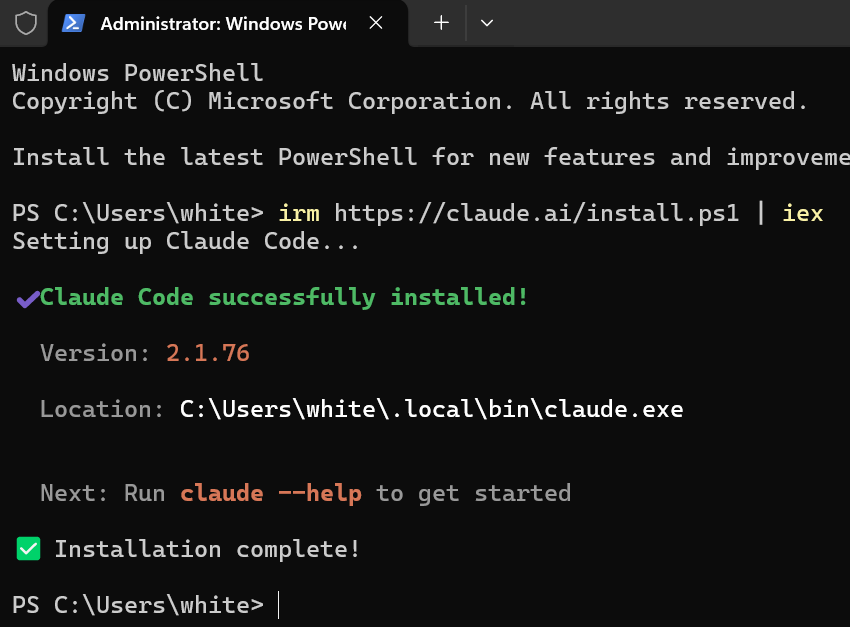
<p>Run with PowerShell:</p>
<pre class="astro-code notebook" style="background-color:#1b1e19;color:#e5e9de; overflow-x: auto;" tabindex="0" data-language="powershell"><code><span class="line"><span style="color:#E5E9DE">irm https:</span><span style="color:#D2D9CA">//</span><span style="color:#E5E9DE">claude.ai</span><span style="color:#D2D9CA">/</span><span style="color:#E5E9DE">install.ps1 </span><span style="color:#D2D9CA">|</span><span style="color:#E5E9DE"> iex</span></span></code></pre>
<p><img src="/assets/img/posts/use-claude-code-with-different-providers/windows-install.png" alt="Claude Code Installation" width="850" loading="lazy" decoding="async" style=";width:60%" height="627"></p>
<hr>
<h4 id="linux--macos">Linux &#x26; macOS</h4>
<pre class="astro-code notebook" style="background-color:#1b1e19;color:#e5e9de; overflow-x: auto;" tabindex="0" data-language="bash"><code><span class="line"><span style="color:#E2D69B">curl</span><span style="color:#C0D99C"> -fsSL</span><span style="color:#C0D99C"> https://claude.ai/install.sh</span><span style="color:#D2D9CA"> |</span><span style="color:#E2D69B"> bash</span></span></code></pre>
<hr>
<h3 id="setting-up-the-environment-path-for-claudeexe-windows">Setting up the Environment Path for claude.exe (Windows)</h3>
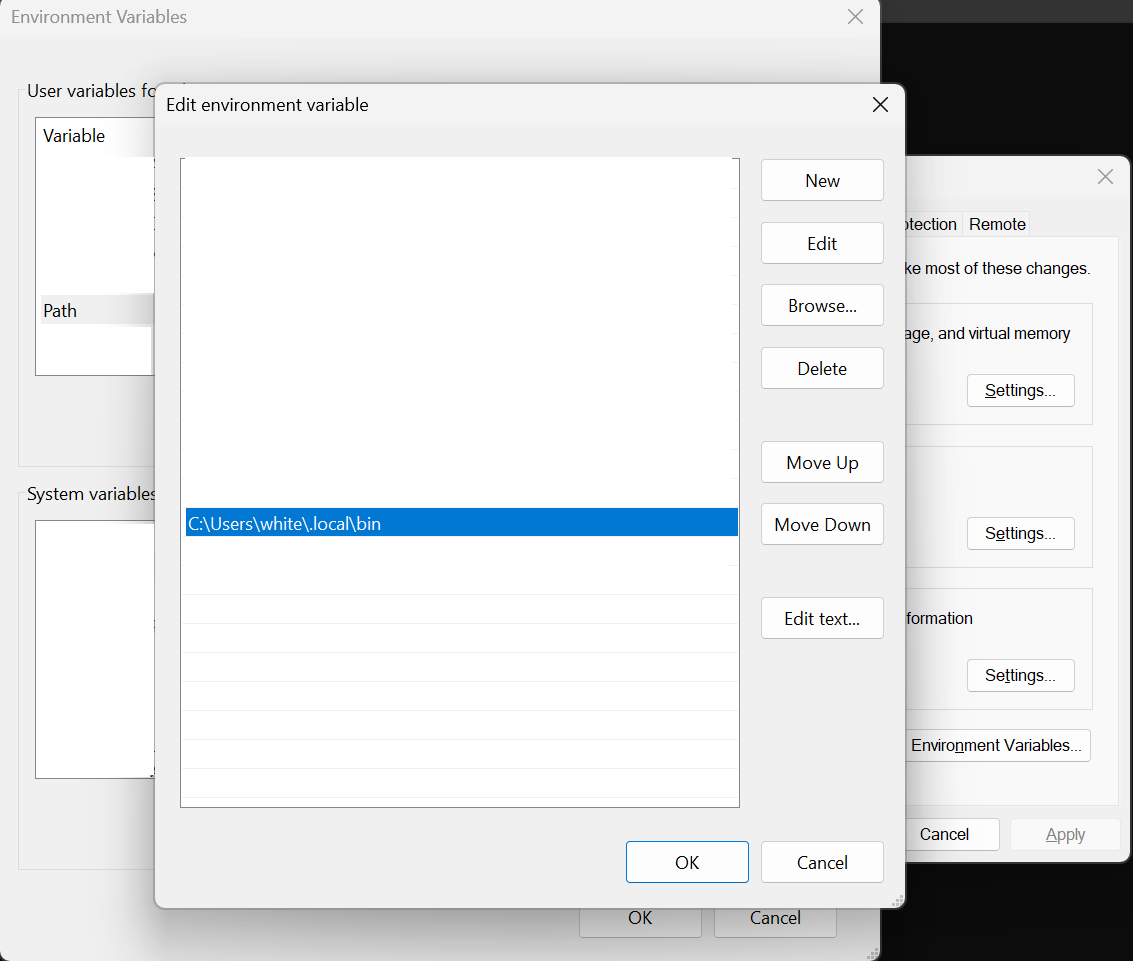
<p>After installation, add the Claude Code binary folder to your system PATH environment variable.</p>
<pre class="astro-code notebook" style="background-color:#1b1e19;color:#e5e9de; overflow-x: auto;" tabindex="0" data-language="powershell"><code><span class="line"><span style="color:#E5E9DE">C:\Users\USERNAME\.local\bin</span></span></code></pre>
<p><img src="/assets/img/posts/use-claude-code-with-different-providers/windows-claudecode-env-bin.png" alt="Claude Code Binary Path Setup" width="1133" loading="lazy" decoding="async" style=";width:60%" height="961"></p>
<hr>
<h3 id="configuration-with-environment-variables">Configuration with Environment Variables</h3>
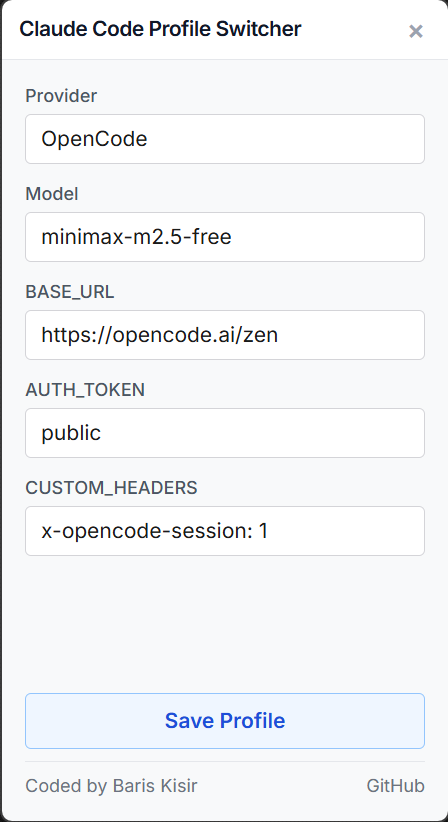
<p>Claude Code can be configured using environment variables to work with different providers. Here are the key environment variables:</p>
<ul>
<li><strong>ANTHROPIC_BASE_URL</strong> - The API endpoint (default: <code>https://api.anthropic.com</code>)</li>
<li><strong>ANTHROPIC_MODEL</strong> - The selected model to use</li>
<li><strong>ANTHROPIC_AUTH_TOKEN</strong> - Your API key or authentication token</li>
<li><strong>ANTHROPIC_CUSTOM_HEADERS</strong> - Custom headers for specific providers (optional)</li>
</ul>
<pre class="astro-code notebook" style="background-color:#1b1e19;color:#e5e9de; overflow-x: auto;" tabindex="0" data-language="bash"><code><span class="line"><span style="color:#98A88B;font-style:italic"># Make sure you have installed Node.js</span></span>
<span class="line"><span style="color:#E2D69B">npx</span><span style="color:#C0D99C"> claude-code-profile-switcher</span></span></code></pre>
<p><img src="https://raw.githubusercontent.com/bariskisir/ClaudeCodeProfileSwitcher/master/screenshot.png" width="30%" alt="Screenshot" loading="lazy" decoding="async"></p>
<p>Select a provider and model, enter your API key, then click save. The tool will store these as environment variables based on your operating system.
Make sure you open a new terminal after setting environment variables.</p>
<hr>
<h5 id="default-model">Default Model</h5>
<p>Run Claude Code with the default configured model:</p>
<pre class="astro-code notebook" style="background-color:#1b1e19;color:#e5e9de; overflow-x: auto;" tabindex="0" data-language="bash"><code><span class="line"><span style="color:#E2D69B">claude</span></span></code></pre>
<hr>
<h5 id="specific-model">Specific Model</h5>
<p>Run Claude Code with a specific model using the <code>--model</code> flag:</p>
<pre class="astro-code notebook" style="background-color:#1b1e19;color:#e5e9de; overflow-x: auto;" tabindex="0" data-language="bash"><code><span class="line"><span style="color:#E2D69B">claude</span><span style="color:#C0D99C"> --model</span><span style="color:#C0D99C"> z-ai/glm-5</span></span></code></pre>
<hr>
<h5 id="skip-permission-checks">Skip Permission Checks</h5>
<p>If needed, you can skip permission confirmations with the <code>--allow-dangerously-skip-permissions</code> flag:</p>
<pre class="astro-code notebook" style="background-color:#1b1e19;color:#e5e9de; overflow-x: auto;" tabindex="0" data-language="bash"><code><span class="line"><span style="color:#E2D69B">claude</span><span style="color:#C0D99C"> --model</span><span style="color:#C0D99C"> moonshotai/kimi-k2.5</span><span style="color:#C0D99C"> --allow-dangerously-skip-permissions</span></span></code></pre>
<hr>
<h3 id="finding-free-and-trial-providers">Finding Free and Trial Providers</h3>
<p>Many providers offer free and trial LLMs that work with Claude Code. Check out this comprehensive list:</p>
<p><a href="https://gist.github.com/bariskisir/397327752c86c6e5a815ce524621ae79">Free and Trial Providers List</a></p>
<hr>
<h3 id="bonus-add-claude-code-to-windows-context-menu">Bonus: Add Claude Code to Windows Context Menu</h3>
<p>Make Claude Code even more convenient by adding it to your Windows right-click context menu.</p>
<hr>
<h5 id="install-context-menu">Install Context Menu</h5>
<pre class="astro-code notebook" style="background-color:#1b1e19;color:#e5e9de; overflow-x: auto;" tabindex="0" data-language="bash"><code><span class="line"><span style="color:#E2D69B">powershell</span><span style="color:#C0D99C"> -ExecutionPolicy</span><span style="color:#C0D99C"> Bypass</span><span style="color:#C0D99C"> -Command</span><span style="color:#C0D99C"> "irm https://raw.githubusercontent.com/bariskisir/ClaudeCodeContextMenu/master/install.ps1 | iex"</span></span></code></pre>
<hr>
<h5 id="uninstall-context-menu">Uninstall Context Menu</h5>
<pre class="astro-code notebook" style="background-color:#1b1e19;color:#e5e9de; overflow-x: auto;" tabindex="0" data-language="bash"><code><span class="line"><span style="color:#E2D69B">powershell</span><span style="color:#C0D99C"> -ExecutionPolicy</span><span style="color:#C0D99C"> Bypass</span><span style="color:#C0D99C"> -Command</span><span style="color:#C0D99C"> "irm https://raw.githubusercontent.com/bariskisir/ClaudeCodeContextMenu/master/uninstall.ps1 | iex"</span></span></code></pre>
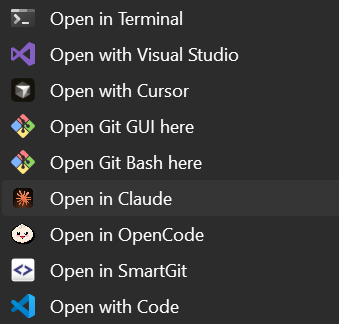
<p><img src="https://raw.githubusercontent.com/bariskisir/ClaudeCodeContextMenu/master/screenshot.png" alt="Claude Code Context Menu" width="30%" loading="lazy" decoding="async"></p>
---
<hr>
<h3 id="references--documentation">References &#x26; Documentation</h3>
<p>Claude Code Quick Start - <a href="https://code.claude.com/docs/en/quickstart">https://code.claude.com/docs/en/quickstart</a></p>
<p>LLM Gateway - <a href="https://code.claude.com/docs/en/llm-gateway">https://code.claude.com/docs/en/llm-gateway</a></p>
<p>Model Configuration - <a href="https://code.claude.com/docs/en/model-config">https://code.claude.com/docs/en/model-config</a></p>
<p>Environment Variables - <a href="https://code.claude.com/docs/en/env-vars">https://code.claude.com/docs/en/env-vars</a></p>
<p>Claude Code Context Menu - <a href="https://github.com/bariskisir/ClaudeCodeContextMenu">https://github.com/bariskisir/ClaudeCodeContextMenu</a></p>
<p>OpenCode Context Menu - <a href="https://github.com/bariskisir/OpenCodeContextMenu">https://github.com/bariskisir/OpenCodeContextMenu</a></p>
<p>Codex Context Menu - <a href="https://github.com/bariskisir/CodexContextMenu">https://github.com/bariskisir/CodexContextMenu</a></p>
<p>Gemini Context Menu - <a href="https://github.com/bariskisir/GeminiContextMenu">https://github.com/bariskisir/GeminiContextMenu</a></p>]]></content>
      <summary type="html"><![CDATA[Configure Claude Code with different AI providers. Access free and paid models including Gemini, OpenAI, and Groq.]]></summary>
      <category term="ai"/><category term="integration"/>
      <media:thumbnail url="https://www.bariskisir.com/assets/img/posts/use-claude-code-with-different-providers/claude-code.png"/><media:content medium="image" url="https://www.bariskisir.com/assets/img/posts/use-claude-code-with-different-providers/claude-code.png"/>
    </entry><entry>
      <title type="html">Is Chess960 Actually Fair? Breaking Down the Numbers</title>
      <link href="https://www.bariskisir.com/blog/is-chess960-actually-fair-breaking-down-the-numbers" rel="alternate" type="text/html" title="Is Chess960 Actually Fair? Breaking Down the Numbers"/>
      <id>https://www.bariskisir.com/blog/is-chess960-actually-fair-breaking-down-the-numbers</id><published>2026-02-14T09:55:00+03:00</published><updated>2026-02-14T09:55:00+03:00</updated>
      <author><name>Barış Kısır</name></author>
      <content type="html" xml:base="https://www.bariskisir.com/blog/is-chess960-actually-fair-breaking-down-the-numbers"><![CDATA[<a href="https://www.freestyle-chess.com/2026-germany-weissenhaus/" target="_blank" rel="noopener noreferrer">
  <img src="/assets/img/posts/freestyle-chess-2026.jpg" alt="Freestyle Chess World Championship" width="1280" loading="eager" decoding="async" style=";width:70%" height="720">
</a>
<p>In Chess960, the starting position is randomly selected from 960 possibilities before the match, with two rules: Bishops must be on opposite colors, and the King must be between the Rooks.</p>
<p>Have you ever wondered if the “First Move Advantage” in chess is actually fair? Or does randomization in Chess960 (Fischer Random) introduce a hidden “Luck Factor” that we haven’t fully quantified?</p>
<p>In standard chess, we know White starts with a slight edge. But what happens when you shuffle the pieces into one of 960 random positions? Is every starting position created equal? I decided to find out using <strong>Stockfish 18</strong> at a consistent <strong>Depth 25</strong>.</p>
<h2 id="the-luck-gap">The “Luck” Gap</h2>
<p>I analyzed all 960 starting positions. The results were fascinating and a bit concerning for competitive integrity.</p>
<p>While standard chess (Position 518) gives White a familiar <strong>+0.32</strong> advantage, some shuffle variations push this number to nearly <strong>+0.80</strong>. To put that in perspective, +0.80 is almost a full pawn advantage without a single move being played.</p>
<p>On the flip side, some setups are incredibly docile, evaluating at a dead <strong>0.00</strong>.</p>
<blockquote>
<p><strong>The Unofficial “Luck Factor”:</strong> If the randomizer selects ID <strong>#80</strong> (Highest Advantage), White is effectively gifted a winning advantage. If ID <strong>#644</strong> is selected, the game starts dead even. In a short tournament format, this variance matters.</p>
</blockquote>
<h2 id="the-data">The Data</h2>
<p>Here are the positions where the “Luck of the Draw” heavily favors White, and the positions where Black has the easiest time equalizing.</p>
<h3 id="️-whites-top-10-highest-advantage">🏛️ White’s Top 10 (Highest Advantage)</h3>
<p>Randomization gifts White a massive head start here. Eval is near <strong>+0.80</strong>.</p>


<table tabindex="0"><thead><tr><th align="left">ID</th><th align="left">Eval</th><th align="left">Placement</th><th align="left">Pieces</th></tr></thead><tbody><tr><td align="left"><strong>80</strong></td><td align="left"><strong>+0.80</strong></td><td align="left"><code>BBNNRKRQ</code></td><td align="left">♗♗♘♘♖♔♖♕</td></tr><tr><td align="left">477</td><td align="left">+0.79</td><td align="left"><code>RNNBKRBQ</code></td><td align="left">♖♘♘♗♔♖♗♕</td></tr><tr><td align="left">604</td><td align="left">+0.77</td><td align="left"><code>RBQNKRBN</code></td><td align="left">♖♗♕♘♔♖♗♘</td></tr><tr><td align="left">848</td><td align="left">+0.77</td><td align="left"><code>BBRKNRNQ</code></td><td align="left">♗♗♖♔♘♖♘♕</td></tr><tr><td align="left">879</td><td align="left">+0.77</td><td align="left"><code>QRKRNNBB</code></td><td align="left">♕♖♔♖♘♘♗♗</td></tr><tr><td align="left">935</td><td align="left">+0.77</td><td align="left"><code>RKBRNQNB</code></td><td align="left">♖♔♗♖♘♕♘♗</td></tr><tr><td align="left">794</td><td align="left">+0.75</td><td align="left"><code>RQKNBBRN</code></td><td align="left">♖♕♔♘♗♗♖♘</td></tr><tr><td align="left">176</td><td align="left">+0.74</td><td align="left"><code>BBNRNKRQ</code></td><td align="left">♗♗♘♖♘♔♖♕</td></tr><tr><td align="left">557</td><td align="left">+0.74</td><td align="left"><code>RNKBNQBR</code></td><td align="left">♖♘♔♗♘♕♗♖</td></tr></tbody></table>
<hr>
<h3 id="️-blacks-top-10-least-disadvantage">🛡️ Black’s Top 10 (Least Disadvantage)</h3>
<p>These positions are effectively drawn from move 1. Eval is <strong>-0.01</strong> to <strong>+0.12</strong>.</p>


<table tabindex="0"><thead><tr><th align="left">ID</th><th align="left">Eval</th><th align="left">Placement</th><th align="left">Pieces</th></tr></thead><tbody><tr><td align="left"><strong>644</strong></td><td align="left"><strong>-0.01</strong></td><td align="left"><code>RBBNKRQN</code></td><td align="left">♖♗♗♘♔♖♕♘</td></tr><tr><td align="left">247</td><td align="left">+0.07</td><td align="left"><code>NRBKQNRB</code></td><td align="left">♘♖♗♔♕♘♖♗</td></tr><tr><td align="left">497</td><td align="left">+0.08</td><td align="left"><code>BRQBNKNR</code></td><td align="left">♗♖♕♗♘♔♘♖</td></tr><tr><td align="left">774</td><td align="left">+0.09</td><td align="left"><code>QRBKNBRN</code></td><td align="left">♕♖♗♔♘♗♖♘</td></tr><tr><td align="left">204</td><td align="left">+0.09</td><td align="left"><code>QBNRKNBR</code></td><td align="left">♕♗♘♖♔♘♗♖</td></tr><tr><td align="left">194</td><td align="left">+0.10</td><td align="left"><code>BQNRKBNR</code></td><td align="left">♗♕♘♖♔♗♘♖</td></tr><tr><td align="left">603</td><td align="left">+0.11</td><td align="left"><code>RQNKBRNB</code></td><td align="left">♖♕♘♔♗♖♘♗</td></tr><tr><td align="left">29</td><td align="left">+0.11</td><td align="left"><code>NQNBRKBR</code></td><td align="left">♘♕♘♗♖♔♗♖</td></tr><tr><td align="left">593</td><td align="left">+0.12</td><td align="left"><code>BRQBNKRN</code></td><td align="left">♗♖♕♗♘♔♖♘</td></tr><tr><td align="left">269</td><td align="left">+0.12</td><td align="left"><code>NRKBNQBR</code></td><td align="left">♘♖♔♗♘♕♗♖</td></tr></tbody></table>
<hr>
<h2 id="conclusion">Conclusion</h2>
<p>Chess960 succeeds in killing memorization, but it introduces a new variable: <strong>Randomness</strong>. While aiming to test pure skill, it inadvertently tests a player’s ability to adapt to “lucky” or “unlucky” starting evaluations.</p>
<p><strong>However, this analysis is strictly for engines.</strong> For humans, the reality is different. Being White in a completely unfamiliar position, without centuries of theory to guide you, can actually feel like a disadvantage. You are forced to formulate a plan from scratch while under pressure, often making the “First Move Advantage” purely theoretical.</p>
<p>Perhaps true fairness isn’t about equal engine evaluations, but about how well you can navigate the unique chaos you’re dealt.</p>
<blockquote>
<p><em>This analysis was inspired by the <strong><a href="https://www.freestyle-chess.com/2026-germany-weissenhaus/" target="_blank" rel="noopener noreferrer">FIDE Freestyle Chess World Championship</a></strong> (Feb 13-15, 2026).</em></p>
</blockquote>
<hr>
<h2 id="references--downloads">References &#x26; Downloads</h2>
<ul>
<li><strong>Tournament:</strong> <a href="https://www.freestyle-chess.com/2026-germany-weissenhaus/" target="_blank" rel="noopener noreferrer">FIDE Freestyle Chess World Championship - Weissenhaus</a></li>
<li><strong>Project Code:</strong> <a href="https://github.com/bariskisir/Chess960EvalAnalyzer" target="_blank" rel="noopener noreferrer">GitHub Repository</a></li>
<li><strong>Full Analysis Data:</strong> <a href="https://raw.githubusercontent.com/bariskisir/Chess960EvalAnalyzer/refs/heads/master/src/Chess960EvalAnalyzer/results.csv" target="_blank" rel="noopener noreferrer">Download results.csv</a></li>
</ul>]]></content>
      <summary type="html"><![CDATA[Is Chess960 actually fair? Analysis of all 960 starting positions using Stockfish 18 reveals hidden first-move advantages.]]></summary>
      <category term="chess"/><category term="analysis"/>
      <media:thumbnail url="https://www.bariskisir.com/assets/img/posts/freestyle-chess-2026.jpg"/><media:content medium="image" url="https://www.bariskisir.com/assets/img/posts/freestyle-chess-2026.jpg"/>
    </entry><entry>
      <title type="html">Building Multi-Platform Docker Images (amd64 &amp; arm64) the Right Way</title>
      <link href="https://www.bariskisir.com/blog/building-multi-platform-docker-images-amd64-arm64-the-right-way" rel="alternate" type="text/html" title="Building Multi-Platform Docker Images (amd64 &amp; arm64) the Right Way"/>
      <id>https://www.bariskisir.com/blog/building-multi-platform-docker-images-amd64-arm64-the-right-way</id><published>2025-06-05T09:15:00+03:00</published><updated>2025-06-05T09:15:00+03:00</updated>
      <author><name>Barış Kısır</name></author>
      <content type="html" xml:base="https://www.bariskisir.com/blog/building-multi-platform-docker-images-amd64-arm64-the-right-way"><![CDATA[<p><strong>The Rise of Heterogeneous Infrastructure</strong></p>
<p>With the proliferation of Apple Silicon (M-series) in development and cost-effective ARM-based instances (like AWS Graviton) in production, the ability to build and distribute multi-platform container images is no longer a luxury but a necessity for modern CI/CD pipelines.</p>
<p><strong>The Problem with <code>docker build</code></strong></p>
<p>A standard <code>docker build</code> creates an image for the architecture of the host machine. If you build an image on an Intel-based CI server, it will fail to launch on an ARM-based production cluster.</p>
<p><strong>Introducing Docker Buildx</strong></p>
<p><code>Docker Buildx</code> is a specialized CLI plugin that extends the docker command with full support for multi-platform builds using <strong>BuildKit</strong>.</p>
<p><strong>Implementation: The Unified Build Command</strong></p>
<p>Using the <code>--platform</code> flag, you can orchestrate Docker to build for multiple architectures simultaneously and push them as a single <strong>Manifest List</strong> to your registry.</p>
<pre class="astro-code notebook" style="background-color:#1b1e19;color:#e5e9de; overflow-x: auto;" tabindex="0" data-language="bash"><code><span class="line"><span style="color:#98A88B;font-style:italic"># Create a new builder instance with multi-arch support</span></span>
<span class="line"><span style="color:#E2D69B">docker</span><span style="color:#C0D99C"> buildx</span><span style="color:#C0D99C"> create</span><span style="color:#C0D99C"> --use</span><span style="color:#C0D99C"> --name</span><span style="color:#C0D99C"> multi-arch-builder</span></span>
<span class="line"></span>
<span class="line"><span style="color:#98A88B;font-style:italic"># Build and Push for both Intel (amd64) and ARM (arm64)</span></span>
<span class="line"><span style="color:#E2D69B">docker</span><span style="color:#C0D99C"> buildx</span><span style="color:#C0D99C"> build</span><span style="color:#C0D99C"> --platform</span><span style="color:#C0D99C"> linux/amd64,linux/arm64</span><span style="color:#E5E9DE"> \</span></span>
<span class="line"><span style="color:#C0D99C">  -t</span><span style="color:#C0D99C"> username/enterprise-app:v1.2</span><span style="color:#C0D99C"> --push</span><span style="color:#C0D99C"> .</span></span></code></pre>
<p><strong>Orchestrating the Dockerfile for Multi-Arch</strong></p>
<p>To ensure your Dockerfile is architecture-agnostic, rely on the official .NET images which provide multi-arch manifests out of the box.</p>
<pre class="astro-code notebook" style="background-color:#1b1e19;color:#e5e9de; overflow-x: auto;" tabindex="0" data-language="dockerfile"><code><span class="line"><span style="color:#98A88B;font-style:italic"># Docker automatically pulls the correct architecture for the 'sdk' tag</span></span>
<span class="line"><span style="color:#C8A7EB">FROM</span><span style="color:#E5E9DE"> mcr.microsoft.com/dotnet/sdk:8.0 </span><span style="color:#C8A7EB">AS</span><span style="color:#E5E9DE"> build</span></span>
<span class="line"><span style="color:#C8A7EB">WORKDIR</span><span style="color:#E5E9DE"> /src</span></span>
<span class="line"><span style="color:#C8A7EB">COPY</span><span style="color:#E5E9DE"> . .</span></span>
<span class="line"><span style="color:#C8A7EB">RUN</span><span style="color:#E5E9DE"> dotnet publish -c Release -o /app/out</span></span>
<span class="line"></span>
<span class="line"><span style="color:#98A88B;font-style:italic"># Final lightweight runtime image</span></span>
<span class="line"><span style="color:#C8A7EB">FROM</span><span style="color:#E5E9DE"> mcr.microsoft.com/dotnet/runtime:8.0</span></span>
<span class="line"><span style="color:#C8A7EB">WORKDIR</span><span style="color:#E5E9DE"> /app</span></span>
<span class="line"><span style="color:#C8A7EB">COPY</span><span style="color:#E5E9DE"> --from=build /app/out .</span></span>
<span class="line"><span style="color:#C8A7EB">ENTRYPOINT</span><span style="color:#E5E9DE"> [</span><span style="color:#C0D99C">"dotnet"</span><span style="color:#E5E9DE">, </span><span style="color:#C0D99C">"App.dll"</span><span style="color:#E5E9DE">]</span></span></code></pre>
<p><strong>Strategic Advantages</strong></p>
<ol>
<li><strong>Cost Efficiency:</strong> ARM instances are typically 20-40% cheaper than equivalent x86 instances.</li>
<li><strong>Performance:</strong> ARM architectures often provide superior performance for specific workloads, such as cryptographic operations or high-concurrency microservices.</li>
<li><strong>Developer Experience:</strong> Ensures that developers on different hardware (Mac vs. Windows/Linux) are testing the exact same container manifest that will run in production.</li>
</ol>
<p><strong>The Advantage of Platform Agnostic Infrastructure</strong></p>
<p>We are moving toward a world where the underlying CPU architecture should be an implementation detail, not a deployment blocker. By integrating <code>Buildx</code> and multi-arch manifests into your CI/CD pipeline, you empower your operations team to choose the most cost-effective or highest-performing hardware without requiring a single change to your application code. It’s about building once and knowing your software is ready for whatever infrastructure comes next.</p>]]></content>
      <summary type="html"><![CDATA[Build multi-platform Docker images for amd64 and arm64 architectures using Docker Buildx and BuildKit for modern CI/CD pipelines.]]></summary>
      <category term="docker"/><category term="devops"/><category term="linux"/>
      
    </entry><entry>
      <title type="html">Top 5 JWT Authentication Mistakes in .NET APIs</title>
      <link href="https://www.bariskisir.com/blog/top-5-jwt-authentication-mistakes-in-net-apis" rel="alternate" type="text/html" title="Top 5 JWT Authentication Mistakes in .NET APIs"/>
      <id>https://www.bariskisir.com/blog/top-5-jwt-authentication-mistakes-in-net-apis</id><published>2024-11-20T18:00:00+03:00</published><updated>2024-11-20T18:00:00+03:00</updated>
      <author><name>Barış Kısır</name></author>
      <content type="html" xml:base="https://www.bariskisir.com/blog/top-5-jwt-authentication-mistakes-in-net-apis"><![CDATA[<p><strong>The Security Illusion of JWTs</strong></p>
<p>JSON Web Tokens (JWT) are ubiquitous in modern API development. However, their perceived simplicity often masks critical security flaws that expose applications to token forgery, identity theft, and replay attacks.</p>
<p><strong>1. Storing Refresh Tokens in Plaintext</strong></p>
<p>Storing refresh tokens as raw strings in your database is a significant security oversight. If your database is compromised, an attacker can use these plaintext tokens to forge new access tokens at will. This creates a high-impact <strong>session hijacking</strong> scenario, reminiscent of vulnerabilities in legacy session management systems, where an attacker can maintain persistent access to a user’s account without ever knowing their credentials.</p>
<ul>
<li><strong>Fix:</strong> Always treat refresh tokens like passwords. Store only their cryptographically hashed versions (e.g., using SHA-256) and validate the incoming token’s hash against the stored value during the refresh flow.</li>
</ul>
<p><strong>2. Weak Signing Secrets</strong></p>
<p>Using a short or predictable string for your <code>IssuerSigningKey</code> is a catastrophic vulnerability. Attackers can use brute-force tools (like <code>jwt-cracker</code>) to discover the secret and sign their own administrative tokens.</p>
<ul>
<li><strong>Fix:</strong> Use a cryptographically strong, 256-bit (32 character) minimum secret key, ideally stored in a managed key vault.</li>
</ul>
<p><strong>3. Storing Sensitive Data in Claims</strong></p>
<p>Remember that JWT payloads are <strong>encoded</strong>, not <strong>encrypted</strong>. Anyone with access to the token string can decode it (via <code>jwt.io</code>) and read the claims.</p>
<ul>
<li><strong>Fix:</strong> Never store passwords, SSNs, or sensitive PII in the token. Only include non-sensitive metadata like <code>sub</code> (user ID) and <code>role</code>.</li>
</ul>
<p><strong>4. Ignoring Token Revocation</strong></p>
<p>Because JWTs are stateless, there is no built-in way to “log out” a user if their token is compromised.</p>
<ul>
<li><strong>Fix:</strong> Implement a <strong>Token Blacklist</strong> (via Redis) or, preferably, utilize <strong>Refresh Tokens</strong> stored in a secure database. Set the Access Token expiration to a very short duration (e.g., 15 minutes).</li>
</ul>
<p><strong>5. Not Validating Critical Parameters</strong></p>
<p>Many implementations fail to strictly validate the <code>Issuer</code>, <code>Audience</code>, and <code>Lifetime</code>.</p>
<ul>
<li><strong>Fix:</strong> Ensure your <code>TokenValidationParameters</code> are configured correctly:</li>
</ul>
<pre class="astro-code notebook" style="background-color:#1b1e19;color:#e5e9de; overflow-x: auto;" tabindex="0" data-language="csharp"><code><span class="line"><span style="color:#A8CEE5">options</span><span style="color:#E5E9DE">.</span><span style="color:#A8CEE5">TokenValidationParameters</span><span style="color:#D2D9CA"> =</span><span style="color:#D2D9CA"> new</span><span style="color:#95D5CE"> TokenValidationParameters</span></span>
<span class="line"><span style="color:#E5E9DE">{</span></span>
<span class="line"><span style="color:#A8CEE5">    ValidateIssuer</span><span style="color:#D2D9CA"> =</span><span style="color:#E4BC8A"> true</span><span style="color:#E5E9DE">,</span></span>
<span class="line"><span style="color:#A8CEE5">    ValidateAudience</span><span style="color:#D2D9CA"> =</span><span style="color:#E4BC8A"> true</span><span style="color:#E5E9DE">,</span></span>
<span class="line"><span style="color:#A8CEE5">    ValidateLifetime</span><span style="color:#D2D9CA"> =</span><span style="color:#E4BC8A"> true</span><span style="color:#E5E9DE">,</span></span>
<span class="line"><span style="color:#A8CEE5">    RequireExpirationTime</span><span style="color:#D2D9CA"> =</span><span style="color:#E4BC8A"> true</span><span style="color:#E5E9DE">,</span></span>
<span class="line"><span style="color:#A8CEE5">    ClockSkew</span><span style="color:#D2D9CA"> =</span><span style="color:#A8CEE5"> TimeSpan</span><span style="color:#E5E9DE">.</span><span style="color:#A8CEE5">Zero</span><span style="color:#98A88B;font-style:italic"> // Remove the default 5-minute leeway</span></span>
<span class="line"><span style="color:#E5E9DE">};</span></span></code></pre>
<p><strong>Security as a Continuous Discipline</strong></p>
<p>The simplicity of JWTs is exactly what makes them dangerous. It’s easy to ship an implementation that “works,” but much harder to ship one that is resilient against a determined attacker. Avoiding these top five mistakes, especially around signing secrets, refresh token storage, and revocation, moves your API from a “good enough” security posture to one that is built on industry-standard defensive patterns. Remember, in security, the smallest oversight is often the largest open door.</p>]]></content>
      <summary type="html"><![CDATA[Avoid the top 5 JWT authentication mistakes in .NET APIs. Secure your tokens against forgery, replay attacks, and weak signing secrets.]]></summary>
      <category term="csharp"/><category term="security"/><category term="jwt"/>
      
    </entry><entry>
      <title type="html">Redis Caching Strategies: When Caching Becomes a Problem</title>
      <link href="https://www.bariskisir.com/blog/redis-caching-strategies-when-caching-becomes-a-problem" rel="alternate" type="text/html" title="Redis Caching Strategies: When Caching Becomes a Problem"/>
      <id>https://www.bariskisir.com/blog/redis-caching-strategies-when-caching-becomes-a-problem</id><published>2024-02-10T14:30:00+03:00</published><updated>2024-02-10T14:30:00+03:00</updated>
      <author><name>Barış Kısır</name></author>
      <content type="html" xml:base="https://www.bariskisir.com/blog/redis-caching-strategies-when-caching-becomes-a-problem"><![CDATA[<p><strong>The Caching Paradox</strong></p>
<p>“Just add a cache” is a common response to performance issues. However, an incorrectly implemented distributed cache (like Redis) can introduce subtle bugs, data inconsistency, and even degrade performance through network congestion or serial overhead.</p>
<p><strong>Common Anti-Patterns</strong></p>
<ol>
<li><strong>The Cache Stampede:</strong> When a highly requested key expires, multiple concurrent requests attempt to regenerate the data simultaneously, overwhelming your database.</li>
<li><strong>Large Object Serialization:</strong> Storing massive object graphs (multi-megabyte JSON strings) in Redis causes high latency during network transmission and CPU spikes during deserialization.</li>
<li><strong>Missing TTL Strategy:</strong> Inconsistent Time-To-Live (TTL) values leading to “stale data” bugs that are notoriously difficult to reproduce in development environments.</li>
</ol>
<p><strong>Advanced Strategies: The Two-Level Cache</strong></p>
<p>To mitigate the network overhead of Redis for extremely hot keys, implement a <strong>Two-Level Cache</strong> (L1: In-Memory, L2: Redis).</p>
<pre class="astro-code notebook" style="background-color:#1b1e19;color:#e5e9de; overflow-x: auto;" tabindex="0" data-language="csharp"><code><span class="line"><span style="color:#C8A7EB">public</span><span style="color:#C8A7EB"> async</span><span style="color:#95D5CE"> Task</span><span style="color:#E5E9DE">&#x3C;</span><span style="color:#95D5CE">T</span><span style="color:#E5E9DE">> </span><span style="color:#E2D69B">GetWithTwoLevelCache</span><span style="color:#E5E9DE">&#x3C;</span><span style="color:#95D5CE">T</span><span style="color:#E5E9DE">>(</span><span style="color:#C8A7EB">string</span><span style="color:#E5E9DE"> key)</span></span>
<span class="line"><span style="color:#E5E9DE">{</span></span>
<span class="line"><span style="color:#98A88B;font-style:italic">    // Level 1: Check fast in-memory cache (e.g., IMemoryCache)</span></span>
<span class="line"><span style="color:#C8A7EB">    if</span><span style="color:#E5E9DE"> (</span><span style="color:#A8CEE5">_memoryCache</span><span style="color:#E5E9DE">.</span><span style="color:#E2D69B">TryGetValue</span><span style="color:#E5E9DE">(</span><span style="color:#A8CEE5">key</span><span style="color:#E5E9DE">, </span><span style="color:#C8A7EB">out</span><span style="color:#95D5CE"> T</span><span style="color:#E5E9DE"> value)) </span><span style="color:#C8A7EB">return</span><span style="color:#A8CEE5"> value</span><span style="color:#E5E9DE">;</span></span>
<span class="line"></span>
<span class="line"><span style="color:#98A88B;font-style:italic">    // Level 2: Fallback to distributed Redis cache</span></span>
<span class="line"><span style="color:#A8CEE5">    value</span><span style="color:#D2D9CA"> =</span><span style="color:#D2D9CA"> await</span><span style="color:#A8CEE5"> _redisCache</span><span style="color:#E5E9DE">.</span><span style="color:#E2D69B">GetAsync</span><span style="color:#E5E9DE">&#x3C;</span><span style="color:#95D5CE">T</span><span style="color:#E5E9DE">>(</span><span style="color:#A8CEE5">key</span><span style="color:#E5E9DE">);</span></span>
<span class="line"></span>
<span class="line"><span style="color:#C8A7EB">    if</span><span style="color:#E5E9DE"> (</span><span style="color:#A8CEE5">value</span><span style="color:#D2D9CA"> !=</span><span style="color:#E4BC8A"> null</span><span style="color:#E5E9DE">)</span></span>
<span class="line"><span style="color:#E5E9DE">    {</span></span>
<span class="line"><span style="color:#98A88B;font-style:italic">        // Back-propagate to L1 for faster subsequent hits</span></span>
<span class="line"><span style="color:#A8CEE5">        _memoryCache</span><span style="color:#E5E9DE">.</span><span style="color:#E2D69B">Set</span><span style="color:#E5E9DE">(</span><span style="color:#A8CEE5">key</span><span style="color:#E5E9DE">, </span><span style="color:#A8CEE5">value</span><span style="color:#E5E9DE">, </span><span style="color:#A8CEE5">TimeSpan</span><span style="color:#E5E9DE">.</span><span style="color:#E2D69B">FromMinutes</span><span style="color:#E5E9DE">(</span><span style="color:#E4BC8A">1</span><span style="color:#E5E9DE">));</span></span>
<span class="line"><span style="color:#E5E9DE">    }</span></span>
<span class="line"></span>
<span class="line"><span style="color:#C8A7EB">    return</span><span style="color:#A8CEE5"> value</span><span style="color:#E5E9DE">;</span></span>
<span class="line"><span style="color:#E5E9DE">}</span></span></code></pre>
<p><strong>Operational Excellence in Redis</strong></p>
<ul>
<li><strong>Key Compression:</strong> Utilize binary serializers like <strong>MessagePack</strong> or <strong>Protobuf</strong> instead of JSON to reduce memory footprint and bandwidth.</li>
<li><strong>Monitoring:</strong> Keep a close watch on the <code>keyspace_hits</code> vs <code>keyspace_misses</code> ratio. A low hit rate might indicate that you are caching the wrong datasets.</li>
<li><strong>Eviction Policies:</strong> Ensure your Redis instance is configured with <code>volatile-lru</code> or <code>allkeys-lru</code> to prevent memory exhaustion by gracefully removing the least recently used keys.</li>
</ul>
<p><strong>Final Thoughts: Caching as a First-Class Citizen</strong></p>
<p>Adding Redis to your stack shouldn’t be a reactive “patch” for slow queries. Instead, treat caching as a primary architectural component. By moving beyond basic “set and forget” patterns and implementing proactive invalidation and two-level strategies, you transform your cache from a source of potential inconsistency into a reliable performance accelerator. The goal isn’t just to make things faster, but to build a system that remains predictable under heavy load.</p>]]></content>
      <summary type="html"><![CDATA[Optimize Redis caching strategies to avoid common pitfalls. Prevent cache stampede, serialization issues, and stale data bugs.]]></summary>
      <category term="architecture"/><category term="redis"/><category term="caching"/><category term="performance"/>
      
    </entry><entry>
      <title type="html">Modular Monolith: Scaling Without Microservices</title>
      <link href="https://www.bariskisir.com/blog/modular-monolith-scaling-without-microservices" rel="alternate" type="text/html" title="Modular Monolith: Scaling Without Microservices"/>
      <id>https://www.bariskisir.com/blog/modular-monolith-scaling-without-microservices</id><published>2023-05-15T10:00:00+03:00</published><updated>2023-05-15T10:00:00+03:00</updated>
      <author><name>Barış Kısır</name></author>
      <content type="html" xml:base="https://www.bariskisir.com/blog/modular-monolith-scaling-without-microservices"><![CDATA[<p><strong>The Microservices Fallacy</strong></p>
<p>In recent years, microservices became the “default” choice for scaling applications, often prematurely. However, for many organizations, the operational overhead, such as service discovery, complex networking, and distributed tracing, outweighs the benefits. The <strong>Modular Monolith</strong> emerges as a superior middle ground, offering the logical separation of microservices with the deployment simplicity of a monolith.</p>
<p><strong>Core Architectural Principles</strong></p>
<p>A modular monolith is not just a “big ball of mud” structured as a single project. It requires strict boundary enforcement between domain modules.</p>
<ol>
<li><strong>Strict Bound Contexts:</strong> Each module represents a distinct domain (e.g., Ordering, Shipping, Catalog) and owns its data and business logic.</li>
<li><strong>Encapsulation:</strong> Modules should communicate through restricted interfaces or internal message buses (e.g., MediatR), never by directly accessing another module’s private implementation or database tables.</li>
<li><strong>Physical Separation:</strong> Initially implemented as separate projects or namespaces, facilitating a future transition to microservices if actually required.</li>
</ol>
<p><strong>Implementation Strategy in .NET</strong></p>
<p>Utilizing the <strong>Clean Architecture</strong> pattern within each module ensures that business logic remains decoupled from external dependencies.</p>
<pre class="astro-code notebook" style="background-color:#1b1e19;color:#e5e9de; overflow-x: auto;" tabindex="0" data-language="csharp"><code><span class="line"><span style="color:#98A88B;font-style:italic">// Example: Cross-module communication via Internal Events</span></span>
<span class="line"><span style="color:#C8A7EB">public</span><span style="color:#C8A7EB"> class</span><span style="color:#95D5CE"> OrderCreatedHandler</span><span style="color:#E5E9DE"> : </span><span style="color:#95D5CE">INotificationHandler</span><span style="color:#E5E9DE">&#x3C;</span><span style="color:#95D5CE">OrderCreatedEvent</span><span style="color:#E5E9DE">></span></span>
<span class="line"><span style="color:#E5E9DE">{</span></span>
<span class="line"><span style="color:#C8A7EB">    private</span><span style="color:#C8A7EB"> readonly</span><span style="color:#95D5CE"> IShippingService</span><span style="color:#E5E9DE"> _shippingService;</span></span>
<span class="line"></span>
<span class="line"><span style="color:#C8A7EB">    public</span><span style="color:#C8A7EB"> async</span><span style="color:#95D5CE"> Task</span><span style="color:#E2D69B"> Handle</span><span style="color:#E5E9DE">(</span><span style="color:#95D5CE">OrderCreatedEvent</span><span style="color:#E5E9DE"> notification, </span><span style="color:#95D5CE">CancellationToken</span><span style="color:#E5E9DE"> ct)</span></span>
<span class="line"><span style="color:#E5E9DE">    {</span></span>
<span class="line"><span style="color:#98A88B;font-style:italic">        // One module reacts to another without direct coupling</span></span>
<span class="line"><span style="color:#D2D9CA">        await</span><span style="color:#A8CEE5"> _shippingService</span><span style="color:#E5E9DE">.</span><span style="color:#E2D69B">ScheduleDelivery</span><span style="color:#E5E9DE">(</span><span style="color:#A8CEE5">notification</span><span style="color:#E5E9DE">.</span><span style="color:#A8CEE5">OrderId</span><span style="color:#E5E9DE">);</span></span>
<span class="line"><span style="color:#E5E9DE">    }</span></span>
<span class="line"><span style="color:#E5E9DE">}</span></span></code></pre>
<p><strong>Strategic Advantages</strong></p>
<ul>
<li><strong>Deployment Simplicity:</strong> A single CI/CD pipeline and runtime environment.</li>
<li><strong>Reduced Latency:</strong> Cross-component calls are in-process rather than over HTTP or gRPC.</li>
<li><strong>Easier Refactoring:</strong> Changing boundaries is significantly simpler within a single codebase than across multiple repositories.</li>
</ul>
<p><strong>Choosing Architecture with Intent</strong></p>
<p>In the end, software architecture isn’t about following the flashiest trends; it’s about managing cognitive load and maintaining a sustainable development pace. A modular monolith allows you to grow your domain logic with the same rigor as microservices, but without the tax of distributed systems complexity. It’s an investment in your team’s productivity, ensuring that when you finally <em>do</em> need to extract a service, you’re doing so from a foundation of structured, decoupled logic rather than a messy entanglement.</p>]]></content>
      <summary type="html"><![CDATA[Scale applications with modular monolith architecture. Achieve microservices-like domain separation without operational complexity.]]></summary>
      <category term="architecture"/><category term="design"/>
      
    </entry><entry>
      <title type="html">Containerization Mastery: Dockerizing .NET Core Applications for Global Distribution</title>
      <link href="https://www.bariskisir.com/blog/containerization-mastery-dockerizing-net-core-applications-for-global-distribution" rel="alternate" type="text/html" title="Containerization Mastery: Dockerizing .NET Core Applications for Global Distribution"/>
      <id>https://www.bariskisir.com/blog/containerization-mastery-dockerizing-net-core-applications-for-global-distribution</id><published>2020-07-19T13:20:00+03:00</published><updated>2020-07-19T13:20:00+03:00</updated>
      <author><name>Barış Kısır</name></author>
      <content type="html" xml:base="https://www.bariskisir.com/blog/containerization-mastery-dockerizing-net-core-applications-for-global-distribution"><![CDATA[<p><strong>The Shift Toward Immutable Infrastructure</strong></p>
<p>In the modern DevOps landscape, containerization has transitioned from an optional optimization to a fundamental requirement. Docker provides a standardized environment that ensures your .NET Core applications run consistently across development, staging, and production boundaries, eliminating the “it works on my machine” paradigm.</p>
<p><strong>Foundational Infrastructure: Environment Configuration</strong></p>
<p>While Docker supports cross-platform execution, implementing your containerization pipeline on a Linux-based architecture (e.g., Ubuntu 20.04) often yields the most predictable results and optimal performance.</p>
<p><strong>Installation Pipeline:</strong></p>
<pre class="astro-code notebook" style="background-color:#1b1e19;color:#e5e9de; overflow-x: auto;" tabindex="0" data-language="bash"><code><span class="line"><span style="color:#98A88B;font-style:italic"># Updating package indices and installing the Docker engine</span></span>
<span class="line"><span style="color:#E2D69B">sudo</span><span style="color:#C0D99C"> apt-get</span><span style="color:#C0D99C"> update</span><span style="color:#E5E9DE"> &#x26;&#x26; </span><span style="color:#E2D69B">sudo</span><span style="color:#C0D99C"> apt-get</span><span style="color:#C0D99C"> install</span><span style="color:#C0D99C"> -y</span><span style="color:#C0D99C"> docker.io</span></span>
<span class="line"></span>
<span class="line"><span style="color:#98A88B;font-style:italic"># Verification of successful deployment</span></span>
<span class="line"><span style="color:#E2D69B">docker</span><span style="color:#C0D99C"> -v</span></span></code></pre>
<p><strong>Architecting the Container Blueprint: The Multi-Stage Dockerfile</strong></p>
<p>A high-efficiency Dockerfile utilizes multi-stage builds to minimize image size and maximize security by separating the build environment from the runtime environment.</p>
<pre class="astro-code notebook" style="background-color:#1b1e19;color:#e5e9de; overflow-x: auto;" tabindex="0" data-language="dockerfile"><code><span class="line"><span style="color:#98A88B;font-style:italic"># Stage 1: Runtime Base</span></span>
<span class="line"><span style="color:#C8A7EB">FROM</span><span style="color:#E5E9DE"> mcr.microsoft.com/dotnet/core/runtime:3.1 </span><span style="color:#C8A7EB">AS</span><span style="color:#E5E9DE"> base</span></span>
<span class="line"><span style="color:#C8A7EB">WORKDIR</span><span style="color:#E5E9DE"> /app</span></span>
<span class="line"></span>
<span class="line"><span style="color:#98A88B;font-style:italic"># Stage 2: Compilation and Build</span></span>
<span class="line"><span style="color:#C8A7EB">FROM</span><span style="color:#E5E9DE"> mcr.microsoft.com/dotnet/core/sdk:3.1 </span><span style="color:#C8A7EB">AS</span><span style="color:#E5E9DE"> build</span></span>
<span class="line"><span style="color:#C8A7EB">WORKDIR</span><span style="color:#E5E9DE"> /src</span></span>
<span class="line"><span style="color:#C8A7EB">COPY</span><span style="color:#E5E9DE"> [</span><span style="color:#C0D99C">"SimplisticApi.csproj"</span><span style="color:#E5E9DE">, </span><span style="color:#C0D99C">"./"</span><span style="color:#E5E9DE">]</span></span>
<span class="line"><span style="color:#C8A7EB">RUN</span><span style="color:#E5E9DE"> dotnet restore </span><span style="color:#C0D99C">"./SimplisticApi.csproj"</span></span>
<span class="line"><span style="color:#C8A7EB">COPY</span><span style="color:#E5E9DE"> . .</span></span>
<span class="line"><span style="color:#C8A7EB">RUN</span><span style="color:#E5E9DE"> dotnet build </span><span style="color:#C0D99C">"SimplisticApi.csproj"</span><span style="color:#E5E9DE"> -c Release -o /app/build</span></span>
<span class="line"></span>
<span class="line"><span style="color:#98A88B;font-style:italic"># Stage 3: Artifact Publication</span></span>
<span class="line"><span style="color:#C8A7EB">FROM</span><span style="color:#E5E9DE"> build </span><span style="color:#C8A7EB">AS</span><span style="color:#E5E9DE"> publish</span></span>
<span class="line"><span style="color:#C8A7EB">RUN</span><span style="color:#E5E9DE"> dotnet publish </span><span style="color:#C0D99C">"SimplisticApi.csproj"</span><span style="color:#E5E9DE"> -c Release -o /app/publish</span></span>
<span class="line"></span>
<span class="line"><span style="color:#98A88B;font-style:italic"># Stage 4: Final Production Image</span></span>
<span class="line"><span style="color:#C8A7EB">FROM</span><span style="color:#E5E9DE"> base </span><span style="color:#C8A7EB">AS</span><span style="color:#E5E9DE"> final</span></span>
<span class="line"><span style="color:#C8A7EB">WORKDIR</span><span style="color:#E5E9DE"> /app</span></span>
<span class="line"><span style="color:#C8A7EB">COPY</span><span style="color:#E5E9DE"> --from=publish /app/publish .</span></span>
<span class="line"><span style="color:#C8A7EB">ENTRYPOINT</span><span style="color:#E5E9DE"> [</span><span style="color:#C0D99C">"dotnet"</span><span style="color:#E5E9DE">, </span><span style="color:#C0D99C">"SimplisticApi.dll"</span><span style="color:#E5E9DE">]</span></span></code></pre>
<p><strong>Image Orchestration and Local Verification</strong></p>
<p>Once the blueprint is defined, you can build and execute the containerized application locally.</p>
<pre class="astro-code notebook" style="background-color:#1b1e19;color:#e5e9de; overflow-x: auto;" tabindex="0" data-language="bash"><code><span class="line"><span style="color:#98A88B;font-style:italic"># Building the immutable image</span></span>
<span class="line"><span style="color:#E2D69B">docker</span><span style="color:#C0D99C"> build</span><span style="color:#C0D99C"> -t</span><span style="color:#C0D99C"> net-core-app:v1</span><span style="color:#C0D99C"> .</span></span>
<span class="line"></span>
<span class="line"><span style="color:#98A88B;font-style:italic"># Executing the containerized environment</span></span>
<span class="line"><span style="color:#E2D69B">docker</span><span style="color:#C0D99C"> run</span><span style="color:#C0D99C"> net-core-app:v1</span></span></code></pre>
<p><strong>Global Distribution via Docker Hub</strong></p>
<p>To facilitate remote deployment and team collaboration, leverage <strong>Docker Hub</strong> as your centralized image registry.</p>
<ol>
<li><strong>Authentication:</strong> Authenticate your local daemon with the <code>docker login</code> command.</li>
<li><strong>Tagging:</strong> Align your local image name with your Huber username (e.g., <code>username/app-name:tag</code>).</li>
<li><strong>Transmission:</strong> Push the finalized image to the global registry.</li>
</ol>
<pre class="astro-code notebook" style="background-color:#1b1e19;color:#e5e9de; overflow-x: auto;" tabindex="0" data-language="bash"><code><span class="line"><span style="color:#98A88B;font-style:italic"># Naming for distribution</span></span>
<span class="line"><span style="color:#E2D69B">docker</span><span style="color:#C0D99C"> tag</span><span style="color:#C0D99C"> net-core-app:v1</span><span style="color:#C0D99C"> username/professional-net-app:v1</span></span>
<span class="line"></span>
<span class="line"><span style="color:#98A88B;font-style:italic"># Transmitting to the registry</span></span>
<span class="line"><span style="color:#E2D69B">docker</span><span style="color:#C0D99C"> push</span><span style="color:#C0D99C"> username/professional-net-app:v1</span></span></code></pre>
<p><strong>Strategic Advantages of Containerization</strong></p>
<ul>
<li><strong>Isolation:</strong> Ensures application dependencies do not conflict with the host OS or other containers.</li>
<li><strong>Scalability:</strong> Facilitates rapid horizontal scaling via orchestrators like <strong>Kubernetes</strong> or <strong>Docker Swarm</strong>.</li>
<li><strong>Portability:</strong> Single-artifact deployment across any infrastructure that supports the Docker runtime.</li>
</ul>
<blockquote>
<p><strong>Deep Dive:</strong> Explore the comprehensive containerization lifecycle and advanced CI/CD integration patterns on <a href="https://github.com/bariskisir/dockerize-net-core" target="_blank" rel="noopener noreferrer">GitHub</a>.</p>
</blockquote>]]></content>
      <summary type="html"><![CDATA[Dockerize .NET Core applications for consistent deployment across environments. Containerization best practices with Dockerfile examples.]]></summary>
      <category term="docker"/><category term="devops"/>
      
    </entry>
    </feed>